546 - WORKER_RESOURCE_LIMIT Exceeded / WORKER_LIMIT Exceeded
A 546 error indicates that an edge function used more resources (CPU or Memory) than it was allocated. Previously it was WORKER_LIMIT.
Context for the error#
Edge functions run in transient servers called isolates. Each isolate:
- Handles one request at a time
- Is bound to a single function (e.g. an isolate for
func_onewill never servefunc_two)
When a request arrives, the runtime assigns it to a free isolate or spins up a new one if all existing isolates are busy. Each isolate also has resource limitations.
| Resource | Limit |
|---|---|
| CPU cycles | 2s |
| Memory | 250MB |
Once an isolate uses 50% of any resource, it will finish the current request and then shut down.
However, if that remaining request exhausts all CPU or memory before completion, the isolate will terminate immediately and return a 546 response.
Solving the error#
Step 1: Identifying the error#
When an edge function fails due to internal CPU or memory limits, it will return the error:
{ "code": "WORKER_RESOURCE_LIMIT", "message": "Function failed due to not having enough compute resources (please check logs)"}In the function dashboard's Logs tab, you can find the specific error message:
Memory limit exceededCPU Time exceeded
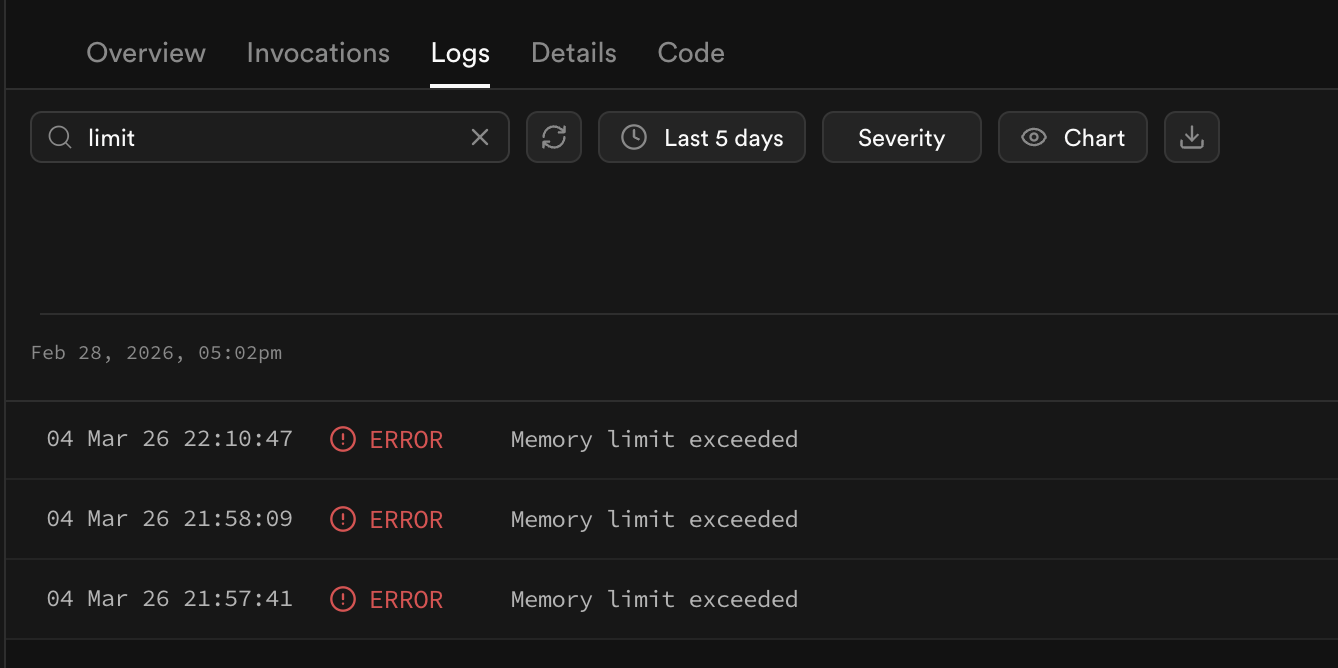
Alternatively, you can filter for the specific errors from the function using the SQL Editor
select fl.event_message, fl.timestamp, fel.function_name, fel.status_codefrom ( select timestamp, event_message, log_attributes['execution_id'] as execution_id from logs where source = 'function_logs' and log_attributes['level'] = 'error' ) as fl inner join ( select log_attributes['execution_id'] as execution_id, log_attributes['request.pathname'] as function_name, log_attributes['response.status_code'] as status_code from logs where source = 'function_edge_logs' and toInt32OrZero(log_attributes['response.status_code']) = 546 ) as fel on fl.execution_id = fel.execution_idorder by fl.timestamp, fel.function_namelimit 20;Step 2: Check error frequency#
Before optimizing, run the below query in the SQL Editor to understand how often 546s are occurring relative to total requests:
select count() as total_responses, countIf(toInt32OrZero(log_attributes['response.status_code']) = 546) as total_546, countIf(toInt32OrZero(log_attributes['response.status_code']) = 546) / count() * 100 as pct_546from logswhere source = 'function_edge_logs' and log_attributes['request.method'] != 'OPTIONS' -- <-- add your function name to inspect specific endpoints and log_attributes['request.pathname'] = '/functions/v1/YOUR_FUNCTION_NAME'limit 1;Depending on the results, you may be able to determine if the event is an edge case or affecting a function's overall behavior.
Interpreting the results#
| 546-rate | What it likely means |
|---|---|
| < 5% | May be an anomaly or edge case with how your function is structure or responds to payloads. May be acceptable for your use case |
| 5-50% | Affecting a meaningful portion of traffic |
| > 50% | Nearly all requests are over-resourced; the function needs significant work |
Step 2: Narrowing down the cause#
Experimenting locally#
The same constraints placed on edge function's hosted by Supabase are also imposed by the test environment spun-up by the CLI. You can follow the function's local development guide to set up a test environment and then serve your function locally:
supabase functions serve your-function --debugThen try experimenting with different stress tests to see if you can induce 546s. Some tests worth trying may involve:
- sending a large payload
- testing varying paths or query parameters
- sending multiple requests at once
If you find a reliable way to induce the error, you may want to log between operations to gain more visibility or configure chrome dev-tools to pinpoint the underlying logic that is failing.
Exploring for failure patterns in the logs#
There are a few other queries that may be useful for identifying patterns around 546 errors.
Step 3: Correcting the error#
The only way to manage the error is to reduce resource consumption per request. There are a few strategies one can go about.
1. Refactor logic:#
If you believe a portion of your function is overly aggressive, try testing locally whether refactoring reduces resource overuse.
Common culprits:
CPU intensive recursions: intensive loops or recursion can exhaust CPU
// This will exhaust CPU allocation when called repeatedlyfunction (: number): number { if ( <= 1) return ; return ( - 1) + ( - 2); // high levels of recursion}for (let = 0; < 100; ++) { (40);}Unbounded memory allocation: filling large arrays in a tight loop prevents the garbage collector from freeing memory
// Each iteration allocates ~100s of KB. During the loops, all memory is consumed before GC can intervenelet = []for (let = 0; < 1000; ++) { .(new (10e4).('data'))}You can compare your function against working examples in the Edge Function docs for insight on how to rework your code.
2. Swap in a lighter package:#
If you're using a dependency that does more than you need, look for a lighter or more performant alternative.
3. Offload operations to the database:#
If you are performing logic to process data from Supabase Postgres, you may be able to handle the processing within the database directly by using database functions or refactored queries.
4. Offload operations to an external API:#
Instead of managing all operations within the function itself, there may be an external API that can execute CPU or memory intensive jobs on its behalf. One example would be using an external API for orchestrating a headless browser and then using the edge function to manage the output of the activity instead of everything all in place.
5. Split operations into individual functions:#
Break a large function into smaller ones, each responsible for a single sub-task. Stitch the results together at the app level or via an orchestrating function.
If you have functions that call other functions, always implement an escape condition. Supabase will terminate functions that recursively self-call past a certain depth, but your code should enforce its own limit.
6. Move to a less restrictive platform:#
Edge functions have a hard resource limit. If your work requires more resources than we permit, you can look into other solutions, such as AWS Lambda, that are less restrictive, or self-host edge functions and reconfigure the settings.
Example cases#
Image processing#
Performing edits against images or other large files can be both CPU and Memory intensive. Some approaches for reducing load is using more performant processing libraries, processing outside by using an API or the requester's server, or restricting the file size to reduce strain.
AI embedding generation and inference#
AI models process data into embeddings (large arrays), that they can more understand. Edge Functions are capable of managing some small models directly; however, some require more processing power than what the edge function can support directly. In these cases, the solution is to manage the embeddings via an external source, such as OpenAI, Anthropic, etc. and to use the edge function for light processing and coordination.
Web scraping#
Web scraping often requires a headless browser operator, such as puppeteer or playwright for rendering web pages. In this case, it is better to use an external API to manage the headless browser for you and then parse the results it returns with the edge function. There's an example in the function docs: Taking Screenshots with Puppeteer