Advanced Log Querying and Filtering
The Logs Explorer exposes logs from each part of the Supabase stack as a separate table that can be queried and joined using SQL.
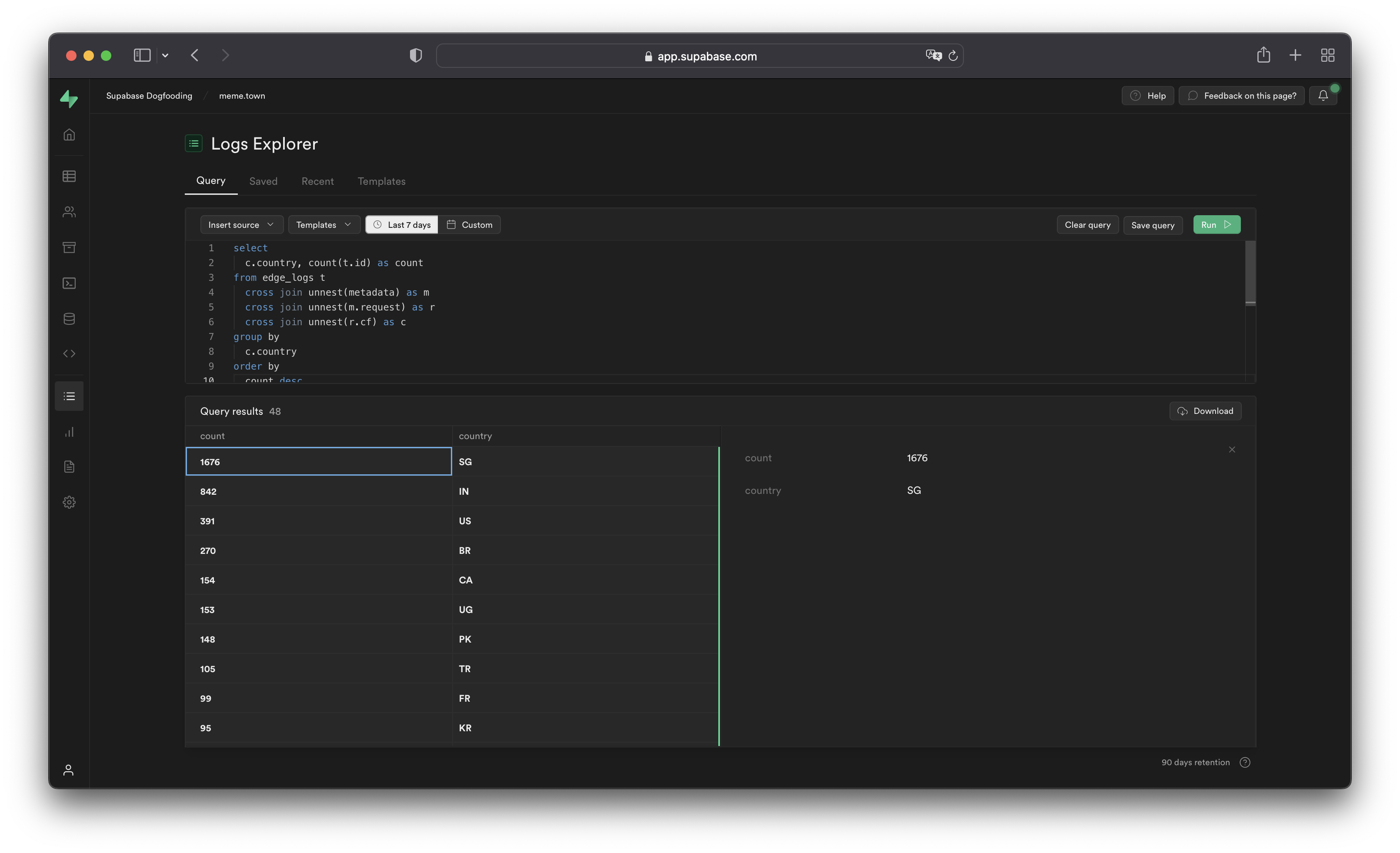
You can access the following logs from the Sources drop-down:
auth_logs: GoTrue server logs, containing authentication/authorization activity.edge_logs: Edge network logs, containing request and response metadata retrieved from Cloudflare.function_edge_logs: Edge network logs for only edge functions, containing network requests and response metadata for each execution.function_logs: Function internal logs, containing anyconsolelogging from within the edge function.postgres_logs: Postgres database logs, containing statements executed by connected applications.realtime_logs: Realtime server logs, containing client connection information.storage_logs: Storage server logs, containing object upload and retrieval information.
The Logs Explorer uses BigQuery and supports all available SQL functions and operators.
Timestamp display and behavior#
BigQuery stores each log entry with a timestamp as a TIMESTAMP data type. Use the appropriate timestamp function to use the timestamp field in a query.
BigQuery renders raw top-level timestamp values as Unix microseconds. To render the timestamps in a human-readable format, use the DATETIME() function to convert the Unix timestamp display into an ISO-8601 timestamp.
1-- timestamp column without datetime()2select timestamp from ....3-- 166427018000045-- timestamp column with datetime()6select datetime(timestamp) from ....7-- 2022-09-27T09:17:10.439ZUnnesting arrays#
Each log event stores metadata as an array of objects with multiple levels, as you can see by selecting single log events in the Logs Explorer. To query arrays, use unnest() on each array field and add it to the query as a join. This allows you to reference the nested objects with an alias and select their individual fields.
For example, to query the edge logs without any joins:
1select timestamp, metadata from edge_logs as t;The Logs Explorer renders the resulting metadata key as an array of objects in the Logs Explorer. In the following diagram, each box represents a nested array of objects:
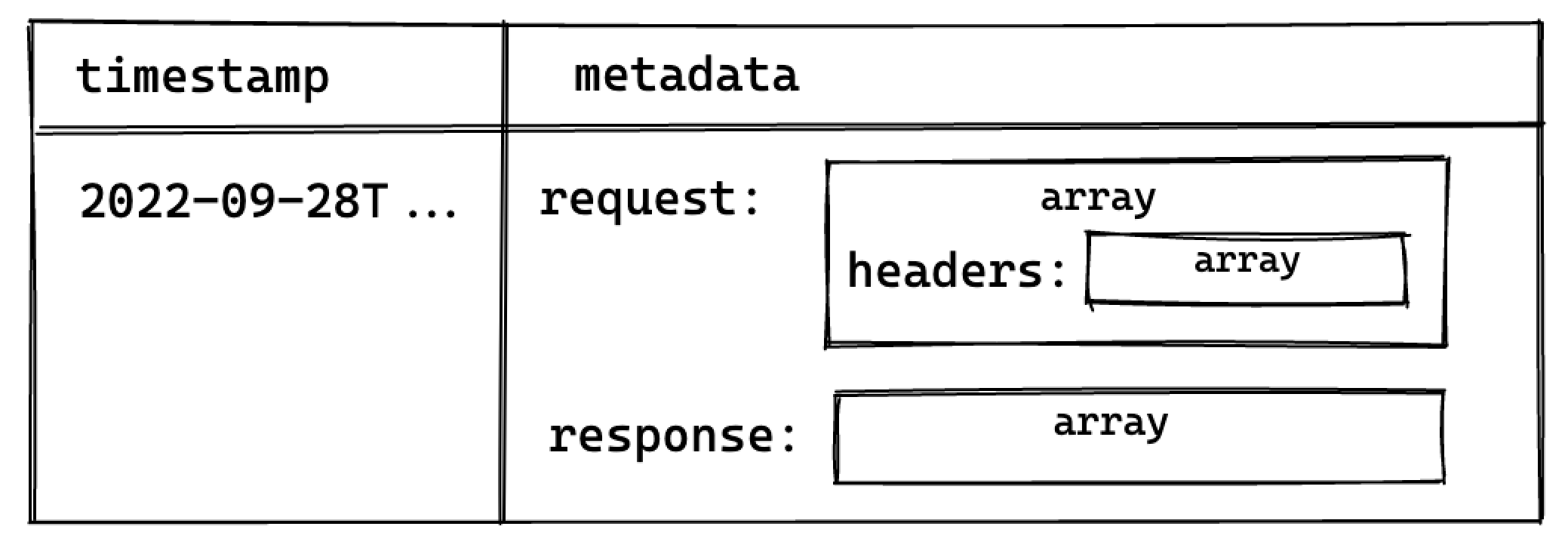
Perform a cross join unnest() to work with the keys nested in the metadata key.
To query for a nested value, add a join for each array level:
1select timestamp, request.method, header.cf_ipcountry2from3 edge_logs as t4 cross join unnest(t.metadata) as metadata5 cross join unnest(metadata.request) as request6 cross join unnest(request.headers) as header;This surfaces the following columns available for selection:
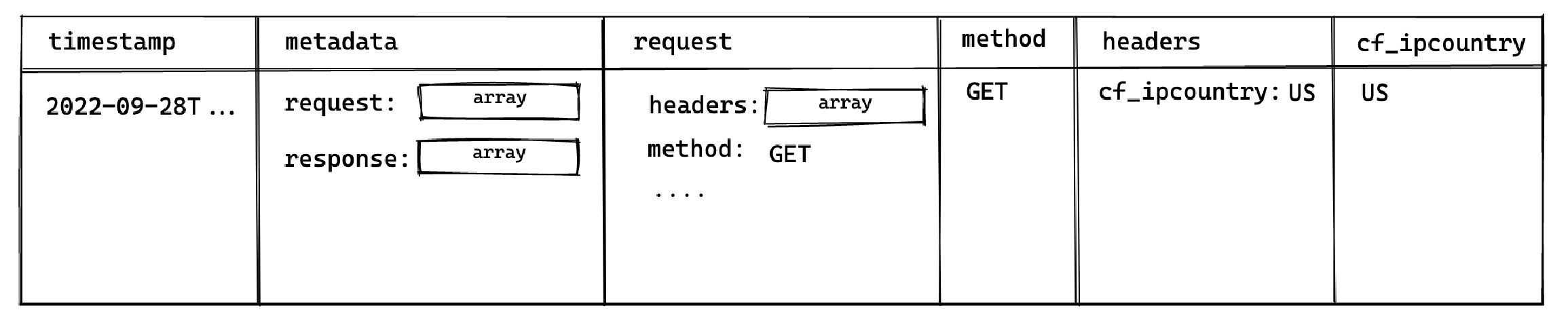
This allows you to select the method and cf_ipcountry columns. In JS dot notation, the full paths for each selected column are:
metadata[].request[].methodmetadata[].request[].headers[].cf_ipcountry
LIMIT and result row limitations#
The Logs Explorer has a maximum of 1000 rows per run. Use LIMIT to optimize your queries by reducing the number of rows returned further.
Best practices#
- Include a filter over timestamp
Querying your entire log history might seem appealing. For Enterprise customers that have a large retention range, you run the risk of timeouts due to additional time required to scan the larger dataset.
- Avoid selecting large nested objects. Select individual values instead.
When querying large objects, the columnar storage engine selects each column associated with each nested key, resulting in a large number of columns being selected. This inadvertently impacts the query speed and may result in timeouts or memory errors, especially for projects with a lot of logs.
Instead, select only the values required.
1-- ❌ Avoid doing this2select3 datetime(timestamp),4 m as metadata -- <- metadata contains many nested keys5from6 edge_logs as t7 cross join unnest(t.metadata) as m;89-- ✅ Do this10select11 datetime(timestamp),12 r.method -- <- select only the required values13from14 edge_logs as t15 cross join unnest(t.metadata) as m16 cross join unnest(m.request) as r;Examples and templates#
The Logs Explorer includes Templates (available in the Templates tab or the dropdown in the Query tab) to help you get started.
For example, you can enter the following query in the SQL Editor to retrieve each user's IP address:
1select datetime(timestamp), h.x_real_ip2from3 edge_logs4 cross join unnest(metadata) as m5 cross join unnest(m.request) as r6 cross join unnest(r.headers) as h7where h.x_real_ip is not null and r.method = "GET";Understanding field references#
You query log tables with a subset of BigQuery SQL syntax. They all have three columns: event_message, timestamp, and metadata.
| column | description |
|---|---|
timestamp | time event was recorded |
event_message | the log's message |
metadata | information about the event |
The metadata column is an array of JSON objects that stores important details about each recorded event. For example, in the Postgres table, the metadata.parsed.error_severity field indicates the error level of an event. To work with its values, you need to unnest them using a cross join.
This approach is commonly used with JSON and array columns, so it might look a bit unfamiliar if you're not used to working with these data types.
1select2 event_message,3 parsed.error_severity,4 parsed.user_name5from6 postgres_logs7 -- extract first layer8 cross join unnest(postgres_logs.metadata) as metadata9 -- extract second layer10 cross join unnest(metadata.parsed) as parsed;Expanding results#
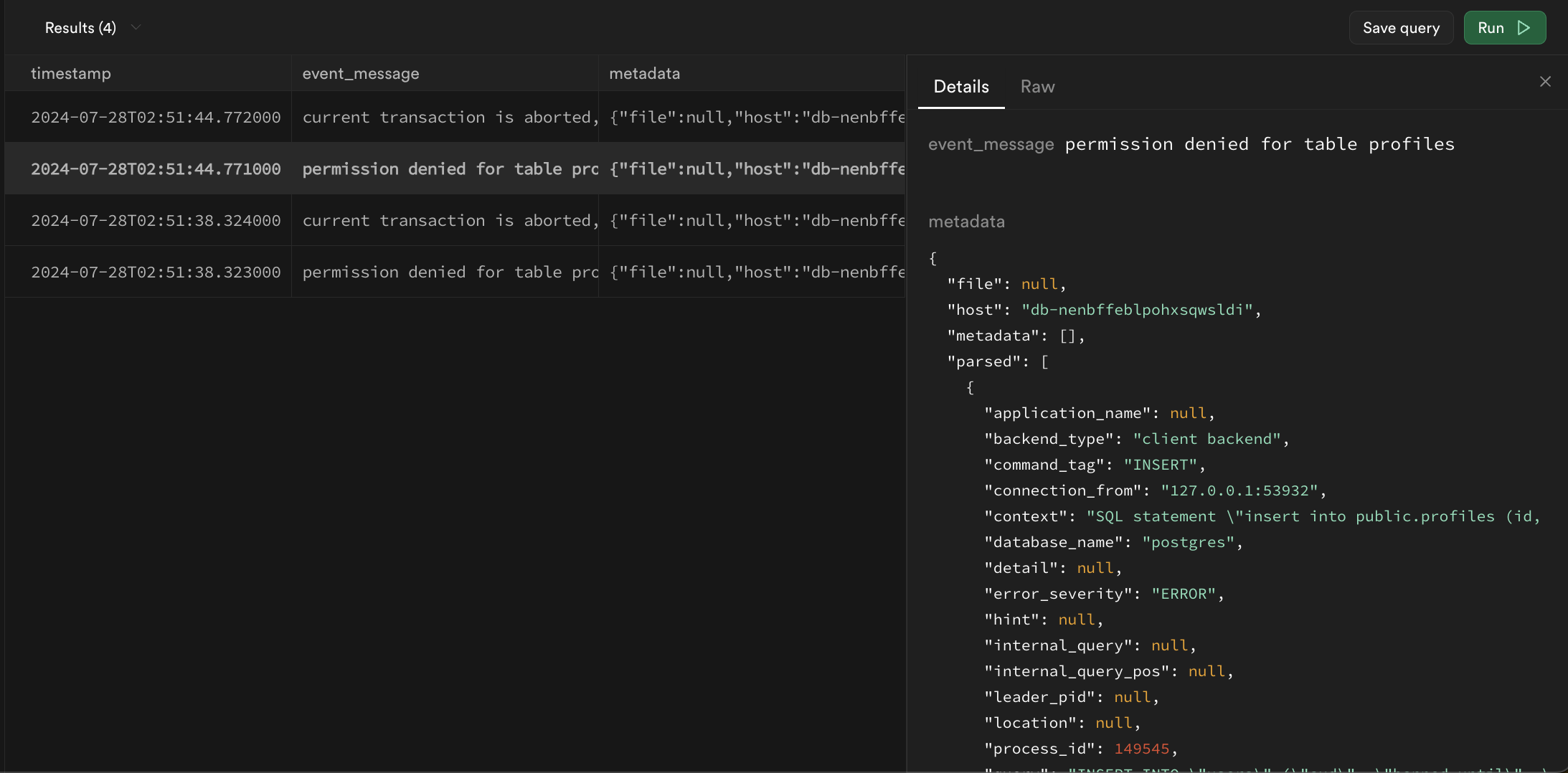
Logs returned by queries may be difficult to read in table format. A row can be double-clicked to expand the results into more readable JSON:
Filtering with regular expressions#
The Logs use BigQuery-style regular expressions with the regexp_contains function. In its most basic form, it checks if a string is present in a specified column.
1select2 cast(timestamp as datetime) as timestamp,3 event_message,4 metadata5from postgres_logs6where regexp_contains(event_message, 'is present');There are multiple operators that you should consider using:
Find messages that start with a phrase#
^ only looks for values at the start of a string
1-- find only messages that start with connection2regexp_contains(event_message, '^connection')Find messages that end with a phrase:#
$ only looks for values at the end of the string
1-- find only messages that ends with port=123452regexp_contains(event_message, 'port=12345$')Ignore case sensitivity:#
(?i) ignores capitalization for all proceeding characters
1-- find all event_messages with the word "connection"2regexp_contains(event_message, '(?i)COnnecTion')Wildcards:#
. can represent any string of characters
1-- find event_messages like "hello<anything>world"2regexp_contains(event_message, 'hello.world')Alphanumeric ranges:#
[1-9a-zA-Z] finds any strings with only numbers and letters
1-- find event_messages that contain a number between 1 and 5 (inclusive)2regexp_contains(event_message, '[1-5]')Repeated values:#
x* zero or more x
x+ one or more x
x? zero or one x
x{4,} four or more x
x{3} exactly 3 x
1-- find event_messages that contains any sequence of 3 digits2regexp_contains(event_message, '[0-9]{3}')Escaping reserved characters:#
\. interpreted as period . instead of as a wildcard
1-- escapes .2regexp_contains(event_message, 'hello world\.')or statements:#
x|y any string with x or y present
1-- find event_messages that have the word 'started' followed by either the word "host" or "authenticated"2regexp_contains(event_message, 'started host|authenticated')and/or/not statements in SQL:#
and, or, and not are all native terms in SQL and can be used in conjunction with regular expressions to filter results
1select2 cast(timestamp as datetime) as timestamp,3 event_message,4 metadata5from postgres_logs6where7 (regexp_contains(event_message, 'connection') and regexp_contains(event_message, 'host'))8 or not regexp_contains(event_message, 'received');Filtering and unnesting example#
Filter for Postgres:
1select2 cast(postgres_logs.timestamp as datetime) as timestamp,3 parsed.error_severity,4 parsed.user_name,5 event_message6from7 postgres_logs8 cross join unnest(metadata) as metadata9 cross join unnest(metadata.parsed) as parsed10where regexp_contains(parsed.error_severity, 'ERROR|FATAL|PANIC')11order by timestamp desc12limit 100;Limitations#
Log tables cannot be joined together#
Each product table operates independently without the ability to join with other log tables. This may change in the future.
The with keyword and subqueries are not supported#
The parser does not yet support with and subquery statements.
The ilike and similar to keywords are not supported#
Although you can use like and other comparison operators, ilike and similar to are incompatible with BigQuery's variant of SQL. Use regexp_contains as an alternative.
The wildcard operator * to select columns is not supported#
The log parser is not able to parse the * operator for column selection. Instead, you can access all fields from the metadata column:
1select2 cast(postgres_logs.timestamp as datetime) as timestamp,3 event_message,4 metadata5from6 <log_table_name>7order by timestamp desc8limit 100;