Settings
Realtime Settings that allow you to configure your Realtime usage.
Settings#
All changes made in this screen will disconnect all your connected clients to ensure Realtime starts with the appropriate settings and all changes are stored in Supabase middleware.
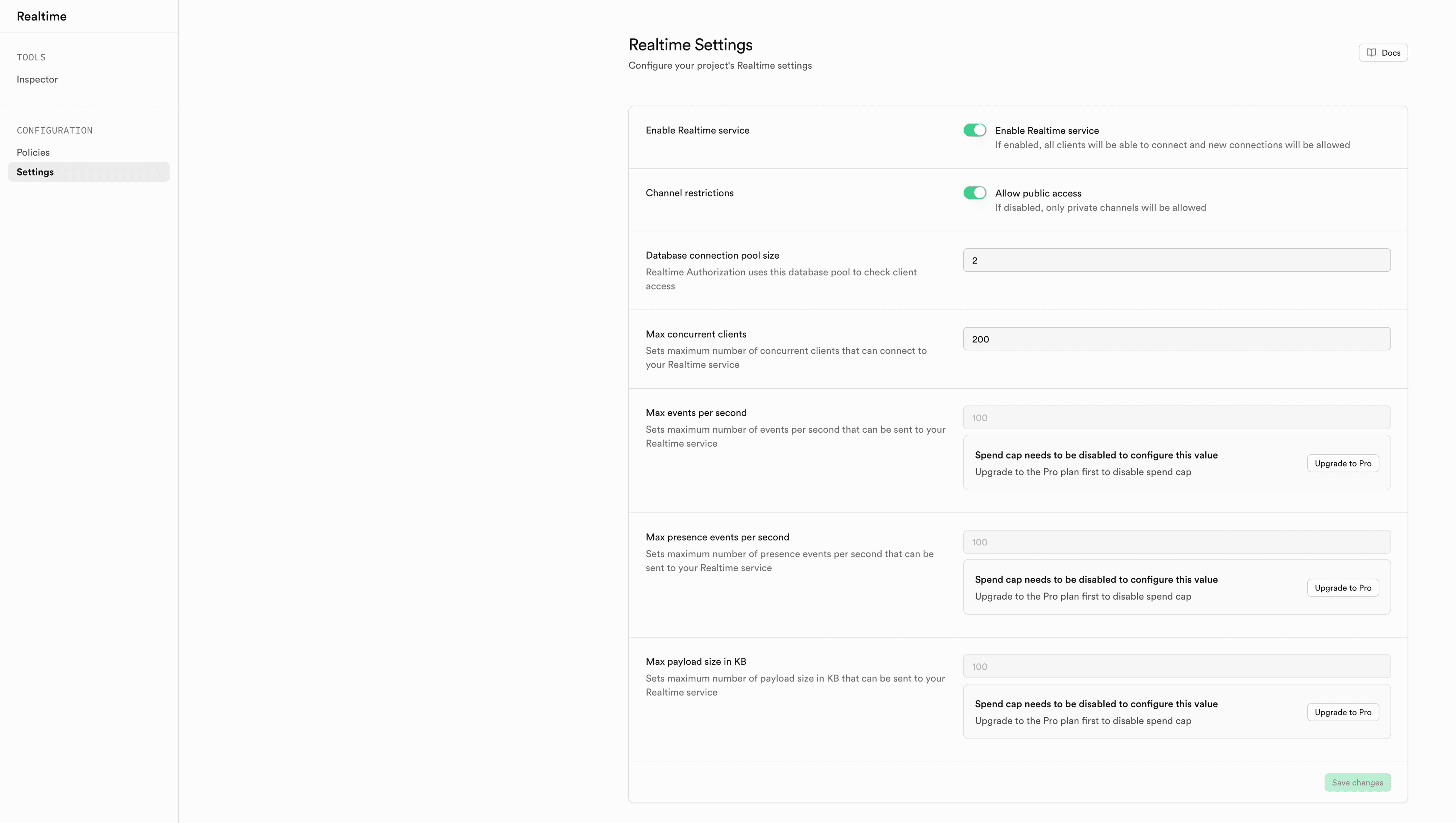
You can set the following settings using the Realtime Settings screen in your Dashboard. For the ceilings your plan allows, see Realtime Limits; the rate and payload limits are only editable while your organization's spend cap is disabled. For the errors below, see Operational Error Codes.
Enable Realtime service#
Type: Toggle · Options: Enabled, Disabled · Default: Enabled
Determines if the Realtime service is enabled or disabled for your project.
- Enabled: normal operation.
- Disabled: connected clients are disconnected, new connections are rejected with
403andRealtime was disabled for this tenant, joins receiveRealtimeDisabledForTenant, and Broadcast REST requests are rejected with403. Realtime also releases the database connections and Postgres Changes replication slot it holds for your project, and reopens them on the first connection after you enable it again.
Allow public access to channels#
Type: Toggle · Options: Enabled, Disabled · Default: Enabled
Determines whether Realtime allows public channels, or restricts your project to private channels with Realtime Authorization.
- Enabled: no policy check runs, but anyone holding your project's anon key can subscribe to and broadcast on any public channel.
- Disabled: every join is checked against the Row Level Security policies on
realtime.messages, so each join costs one authorization query. Clients that don't setconfig.privatetotrueare rejected withPrivateOnly. With no policies, clients connect but receive no messages.
Database connection pool size#
Type: Number of connections · Range: 1 to your database's max_connections · Default: varies by compute size
Determines the number of connections used for Realtime Authorization RLS checking. Results are cached per client, so the pool is used on each private channel join, each access_token refresh, and each private Broadcast REST request.
- Too low: checks queue and time out. Clients receive
IncreaseConnectionPool, broadcasts are dropped, and presence calls fail. Once timeouts in a 30-second window reach the pool size, later checks fail immediately without reaching the database. - Too high: the pool competes with your application for your database's
max_connections. If Realtime's total requirement doesn't fit, it refuses to start withDatabaseLackOfConnections.
See Database connections for the defaults per compute size.
Postgres Changes connection pool size#
Type: Number of connections · Range: 1 to 20 · Default: 2
Determines the number of connections used to create Postgres Changes subscriptions when clients subscribe. It's only used while subscriptions are created; streaming the changes uses a separate connection.
- Too low: subscription creation times out during bursts. Clients receive a
postgres_changessystem error withToo many database timeoutsand retry after 5 to 10 seconds. - Too high: it counts toward the same connection budget as every other Realtime pool.
Raise this value if many clients subscribe at the same time, such as after a deploy or a mass reconnect.
Max concurrent clients#
Type: Number of clients · Range: 1 to your plan's concurrent connections limit · Default: your plan's limit
Determines the maximum number of clients that can be connected. A client is one WebSocket connection, no matter how many channels it joins.
- Too low: new connections are rejected with
429andToo many connected users. Existing clients are unaffected. - Too high: each connection consumes memory on the Realtime nodes, so this setting acts as a capacity and cost control.
Max events per second#
Type: Number of events per second · Range: 1 to your plan's messages per second limit · Default: your plan's limit
Determines the maximum number of events per second that can be sent, measured as a rolling average over the previous minute. An event is a message sent by a client or delivered to one, so one broadcast to 100 subscribers counts as 100 events.
- Too low: channels that exceed the average are closed with
Too many messages per second, whichsupabase-jsrecovers from by rejoining. Broadcast REST requests are rejected with429; those responses carryx-rate-limitandx-rate-limit-remainingheaders you can use to slow down first. - Too high: Realtime stops throttling broadcast fan-out, which removes the protection against a runaway loop or a mass reconnect, and raises the ceiling on your Realtime spend.
Max presence events per second#
Type: Number of events per second · Range: 1 to your plan's presence messages per second limit · Default: your plan's limit
Determines the maximum number of presence events per second that can be sent, using the same rolling average as Max events per second but checked before the event is sent rather than after delivery.
- Too low: presence tracking and syncing fail and the channel is closed with
Too many presence messages per second. - Too high: rapid
trackanduntrackcycles can generate presence storms, because each change is broadcast to every client on the channel and also counts toward Max events per second.
A separate per-client limit also applies to presence, independent of this project-wide setting. A client that exceeds it is closed with Client presence rate limit exceeded. See Realtime Limits for the value on your plan.
Max payload size in KB#
Type: Size in KB · Range: 1 to your plan's broadcast payload size limit · Default: your plan's limit
Determines the maximum payload size in KB that can be sent.
- Too low: oversized broadcasts are dropped, and the sender only learns about it if it set
ack_broadcasttotrue. Broadcast REST requests are rejected with422, and an oversized presencetrackcloses the channel withTrack message size exceeded. - Too high: large messages increase memory and bandwidth usage on every subscriber, since each message is delivered to all clients on the channel. Postgres Changes payloads have a separate limit.