Manage Realtime Peak Connections usage
What you are charged for#
Realtime Peak Connections are measured by tracking the highest number of concurrent connections for each project during the billing cycle. Regardless of fluctuations, only the peak count per project is used for billing, and the totals from all projects are summed. Only successful connections are counted, connection attempts are not included.
Example#
For simplicity, this example assumes a billing cycle of only three days.
| Project | Peak Connections Day 1 | Peak Connections Day 2 | Peak Connections Day 3 |
|---|---|---|---|
| Project A | 80 | 100 | 90 |
| Project B | 120 | 110 | 150 |
Total billed connections: 100 (Project A) + 150 (Project B) = 250 connections
How charges are calculated#
Realtime Peak Connections are billed using Package pricing, with each package representing 1,000 peak connections. If your usage falls between two packages, you are billed for the next whole package.
Example#
For simplicity, assume a package size of 1,000 and a charge of $10 per package with no quota.
| Peak Connections | Packages Billed | Costs |
|---|---|---|
| 999 | 1 | $10 |
| 1,000 | 1 | $10 |
| 1,001 | 2 | $20 |
| 1,500 | 2 | $20 |
Usage on your invoice#
Usage is shown as "Realtime Peak Connections" on your invoice.
Pricing#
$10 per 1,000 peak connections. You are only charged for usage exceeding your subscription plan's quota.
| Plan | Quota | Over-Usage |
|---|---|---|
| Free | 200 | - |
| Pro | 500 | $10 per 1,000 peak connections |
| Team | 500 | $10 per 1,000 peak connections |
| Enterprise | Custom | Custom |
Billing examples#
Within quota#
The organization's connections are within the quota, so no charges apply.
| Line Item | Units | Costs |
|---|---|---|
| Pro Plan | 1 | $25 |
| Compute Hours Small | 730 hours | $15 |
| Realtime Peak Connections | 350 connections | $0 |
| Subtotal | $40 | |
| Compute Credits | -$10 | |
| Total | $30 |
Exceeding quota#
The organization's connections exceed the quota by 1,200, incurring charges for this additional usage.
| Line Item | Units | Costs |
|---|---|---|
| Pro Plan | 1 | $25 |
| Compute Hours Small | 730 hours | $15 |
| Realtime Peak Connections | 1,700 connections | $20 |
| Subtotal | $60 | |
| Compute Credits | -$10 | |
| Total | $50 |
View usage#
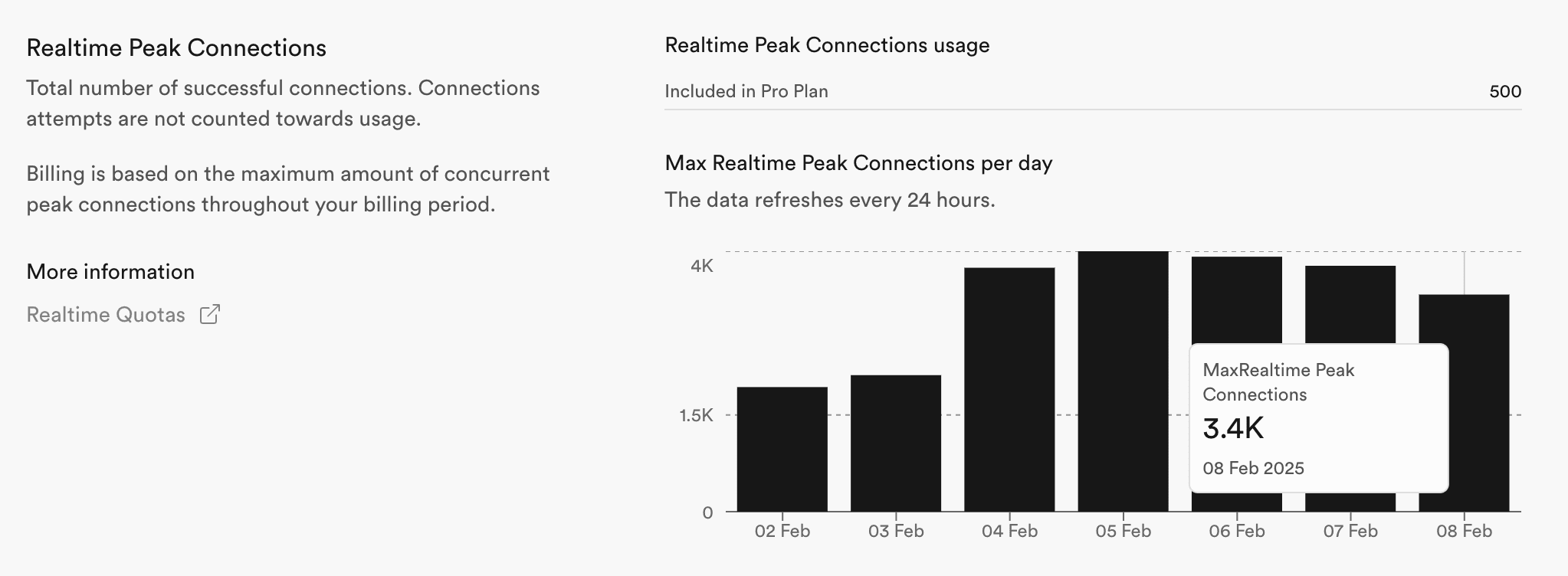
You can view Realtime Peak Connections usage on the organization's usage page. The page shows the usage of all projects by default. To view the usage for a specific project, select it from the dropdown. You can also select a different time period.

In the Realtime Peak Connections section, you can see the usage for the selected time period.
Exceeding Quotas#
If you are on a paid plan and have Spend Cap disabled or your organization is on Team Plan or above, you will pay for any overages.
When you are exceeding your quotas while being on a Free Plan or having Spend Cap enabled, you will get a notification to your billing email address and put under a grace period. For more details, refer to our Fair Use Policy.