BigQuery destination
Replicate Supabase Postgres tables to BigQuery.
Public Alpha
Supabase Pipelines is currently in public alpha. Features and behavior may change as we continue developing the product.
BigQuery is Google's fully managed data warehouse. You can replicate your database tables to BigQuery for analytics and reporting.
Prepare GCP resources#
Before configuring BigQuery as a destination, set up the following in Google Cloud Platform:
-
Google Cloud Platform (GCP) account: Sign up for GCP if you don't have one. In the destination project, make sure the BigQuery API and BigQuery Storage API are enabled.
-
BigQuery dataset: Create a BigQuery dataset in your GCP project
- Open the BigQuery console in GCP
- Select your project
- Click Create Dataset
- Provide a dataset ID, for example
supabase_replication - Choose the dataset location intentionally. Supabase Pipelines run in AWS
eu-central-1(Frankfurt), so choose the closest available BigQuery location to reduce network latency. You can't change a dataset's location after it is created, and Pipelines doesn't infer it from your Supabase project or copy Postgres partitioning settings.
-
GCP service account key: Create a service account with appropriate permissions
- Go to IAM & Admin > Service Accounts
- Click Create Service Account
- Grant BigQuery Data Editor on the destination dataset
- Grant BigQuery Job User on the GCP project
- Create and download the JSON key file
Treat the downloaded JSON as a secret. Don't commit or share it, and rotate or revoke the key if it is exposed.
These roles provide the permissions Pipelines needs to inspect and manage destination tables, write data through the Storage Write API, and run BigQuery jobs. If you use a custom IAM role, it must provide:
bigquery.datasets.getbigquery.jobs.createbigquery.tables.createbigquery.tables.deletebigquery.tables.getbigquery.tables.getDatabigquery.tables.listbigquery.tables.updatebigquery.tables.updateData
Configure BigQuery as a destination#
-
Navigate to the Database > Replication section of the Dashboard
-
Click Add destination
-
Select BigQuery as the destination type
-
Configure the destination details:
- Destination name: A name to identify this destination, for example "BigQuery Warehouse"
- Publication: The publication to replicate data from
- Region: Managed Pipelines run in the fixed AWS
eu-central-1(Frankfurt) region. This is separate from your BigQuery dataset location and can't be changed.
-
Configure the BigQuery settings:
-
Project ID: Your BigQuery project identifier, found in the GCP Console
-
Dataset ID: The name of your BigQuery dataset, without the project ID
In the GCP Console, the dataset is shown as
project-id.dataset-id. Enter only the part after the dot. For example, if you seemy-project.my_dataset, entermy_dataset. -
Service Account Key: Your GCP service account key in JSON format
-
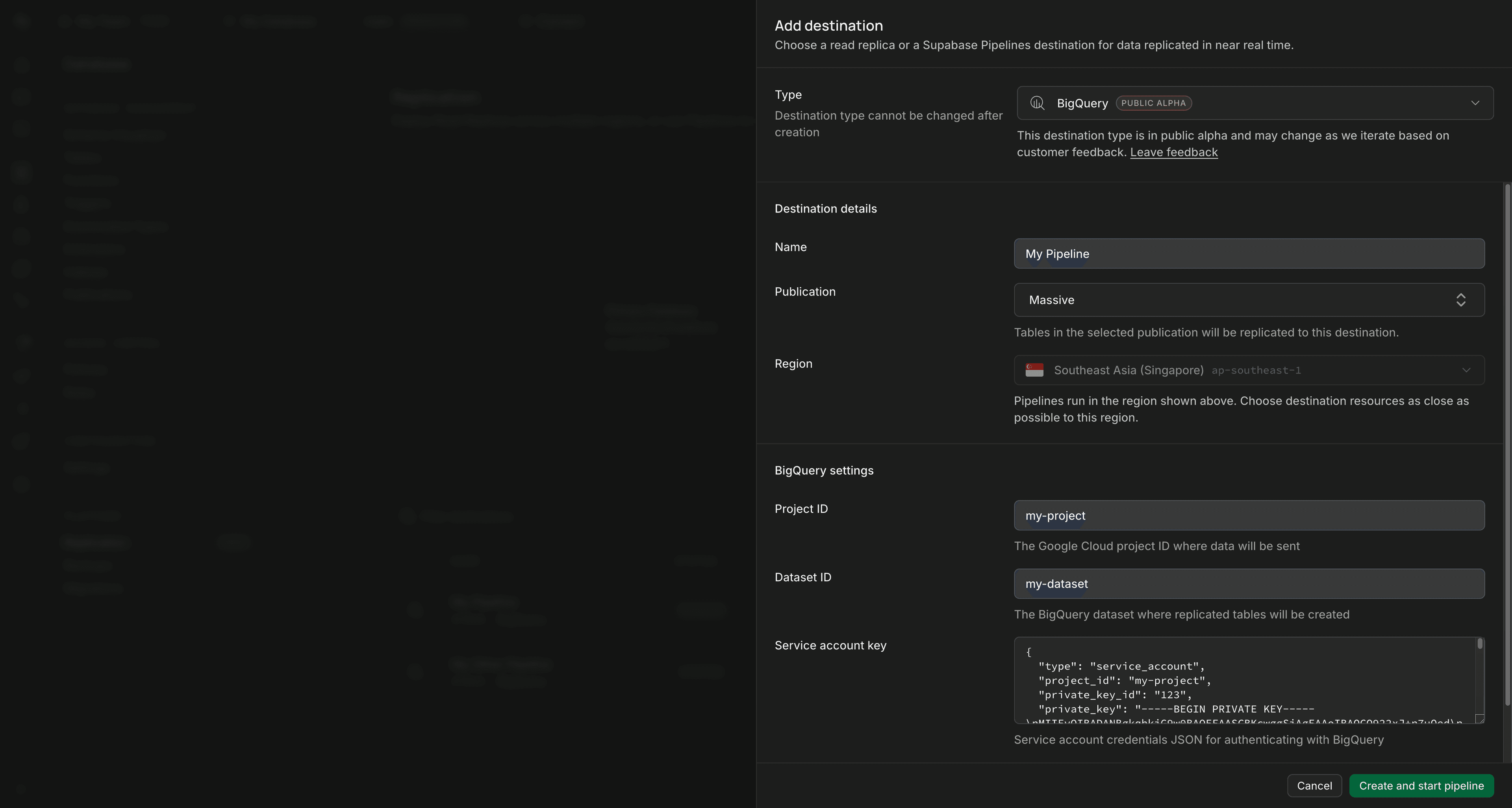
-
Optionally expand Advanced settings for pipeline and BigQuery-specific tuning:
The general batch, initial-sync concurrency, and invalidated-slot settings are described in Set up Pipelines. BigQuery adds these settings:
Setting Default Description Connection pool size 4connectionsNumber of BigQuery Storage Write API connections used for destination writes. More connections can increase write throughput, but consume more pipeline and BigQuery resources. Maximum staleness Freshest results Maximum acceptable staleness, in whole minutes, of table data returned by queries while BigQuery applies CDC UPSERTandDELETEchanges in the background. Leave unset for the freshest table data. A larger number of minutes allows BigQuery to return older data, which can reduce query-time CDC merge cost and latency. For example,15allows data to be up to 15 minutes stale. This value is applied when Pipelines creates or recreates a table; changing it doesn't alter existing destination tables. -
Review the source table requirements, then click Create and start pipeline to begin replication
The pipeline begins the initial sync from your database to BigQuery.
Supabase Pipelines charges and Google Cloud charges are separate. BigQuery can charge for Storage Write API ingestion, storage, and the compute used to apply CDC changes. See BigQuery CDC pricing.
How it works#
Once configured, replication to BigQuery:
- Captures the
INSERT,UPDATE,DELETE, andTRUNCATEoperations included by your Postgres publication - Optimizes delivery automatically
- Creates destination tables from the replicated source schema using BigQuery-compatible names and types
- Streams data to BigQuery
Pipelines keeps a current-state table that you can query for each replicated source table and may replace its destination data during a truncate or new initial sync. It does not provide a history of every row version that you can query.
Source table requirements#
BigQuery replication requires each source table to have a primary key, and the publication must include the primary-key columns. Pipelines declares those columns as the BigQuery destination primary key so BigQuery change data capture (CDC) can apply UPSERT and DELETE rows.
BigQuery primary keys are NOT ENFORCED, and BigQuery change data capture (CDC) supports composite primary keys with up to 16 columns. Your source primary key must stay unique and non-null because BigQuery uses it to match CDC rows.
Source tables must also use a BigQuery-compatible Postgres REPLICA IDENTITY setting. Most tables can keep the Postgres default, as long as they have a primary key and all primary-key columns are included in the publication.
| Source table setting | BigQuery support | Guidance |
|---|---|---|
REPLICA IDENTITY DEFAULT with a primary key | Supported | Recommended for most tables. BigQuery uses the replicated source primary key to apply upserts and deletes. |
REPLICA IDENTITY FULL | Supported | Recommended for tables with large text, jsonb, bytea, or other values that Postgres may store out-of-line using TOAST, especially when those rows update. |
REPLICA IDENTITY USING INDEX | Limited | Supported only when the selected unique index contains exactly the source primary-key columns. An alternative unique-key identity is not supported. |
REPLICA IDENTITY NOTHING | Insert-only | Inserts can be replicated, but updates and deletes do not include enough row identity for BigQuery to apply them safely. |
REPLICA IDENTITY DEFAULT without a primary key | Not supported | BigQuery requires a source primary key. |
For a general explanation of how replica identity affects update and delete events, see How does replica identity affect updates and deletes?.
For updates, Postgres does not always send a complete old row through logical replication. It can also mark unchanged toasted values as unchanged toast instead of resending the value. BigQuery change data capture (CDC) upserts require a complete new row because omitted columns are not preserved in the destination. The replication pipeline can reconstruct a complete update when the old row image contains the missing value, which is reliable with REPLICA IDENTITY FULL.
If a BigQuery pipeline fails with an error about a partial update row, set REPLICA IDENTITY FULL on the affected source table and restart the pipeline. Changing replica identity only affects new WAL records, so a retained update that was written before the change may still need to be skipped by recreating the pipeline or restarting the affected table's initial sync.
Check a table's current replica identity:
select n.nspname as schema_name, c.relname as table_name, c.relreplident as replica_identityfrom pg_class as c join pg_namespace as n on n.oid = c.relnamespacewhere n.nspname = 'public' and c.relname = 'your_table';The replica_identity value is d for default, f for full, i for index, and n for nothing.
Set full replica identity when a table has toasted columns and update replication must be reliable:
alter table public.your_table replica identity full;REPLICA IDENTITY FULL increases WAL volume because Postgres logs the full old row for updates and deletes. Use it on tables where update correctness is more important than the extra replication overhead.
Schema change support#
Schema change support for BigQuery is currently in beta. Pipelines supports a limited set of schema changes for BigQuery while the feature is developed further.
Supported schema changes:
- Adding a scalar, top-level column (created as
NULLABLEin BigQuery) - Removing a column
- Renaming a column
- Dropping a
NOT NULLconstraint - Setting or dropping supported column default metadata
Unsupported or limited schema changes:
- Changing a column's data type
- Adding
NOT NULLwithSET NOT NULL - Filling existing rows for
ADD COLUMN ... DEFAULT - Unsupported default expressions
When the initial sync creates a BigQuery table, Pipelines preserves whether each scalar, non-array source column allows NULL: Postgres NOT NULL columns become REQUIRED, and nullable columns become NULLABLE. BigQuery represents Postgres arrays as REPEATED fields instead of using REQUIRED or NULLABLE mode.
After the table exists, BigQuery requires every newly added scalar, top-level column to be NULLABLE. If Postgres adds a NOT NULL column, Pipelines adds it as NULLABLE in BigQuery and logs a warning. Postgres remains the source of truth and rejects new NULL values before they reach the destination.
For Postgres DROP NOT NULL, Pipelines relaxes an existing BigQuery column from REQUIRED to NULLABLE. For Postgres SET NOT NULL, BigQuery cannot change an existing NULLABLE column to REQUIRED, so Pipelines leaves the destination column nullable and logs a warning.
Column defaults are handled independently from whether the column allows NULL. BigQuery does not support ADD COLUMN ... DEFAULT on an existing table, so Pipelines first adds the nullable column and then applies supported default metadata with a separate statement. This is destination metadata for future BigQuery writes that omit the column; pipeline writes already contain the value evaluated by Postgres, and the metadata doesn't populate existing destination rows. Unsupported defaults, including defaults on destination primary-key columns, are skipped with a warning instead of failing replication.
Limitations#
- Row size: Limited to 10 MB per row due to BigQuery Storage Write API constraints
- Primary keys: Source tables must have a primary key, the replicated primary key can contain at most 16 columns, and BigQuery does not enforce key uniqueness
- Columns: BigQuery CDC supports at most 2,000 top-level columns
- Replica identity: Updates and deletes require a supported primary-key identity or
REPLICA IDENTITY FULL - Schema and table names: Source schema and table names can't start or end with
_or contain"or;when replicating to BigQuery - Arrays and numeric values: Arrays can't contain
NULLelements. Numeric values with more than 38 fractional digits and exact JSON integer values outside BigQuery's supported range can't be replicated. - BigQuery CDC tables: While CDC is active, BigQuery doesn't support mutating DML (
UPDATE,DELETE, orMERGE), wildcard table queries, or search indexes on the destination table. See BigQuery CDC limitations for the complete list. - Managed destination objects: Don't delete or modify tables or views created by Pipelines. Doing so can stop replication and may require a new, billable initial sync.
- Schema changes: Limited to the supported schema changes listed above
Additional resources#
- BigQuery documentation - Official Google BigQuery documentation
- BigQuery change data capture - BigQuery change data capture (CDC) requirements and limitations