Build a Product Management Android App with Jetpack Compose
This tutorial demonstrates how to build a basic product management app. The app demonstrates management operations, photo upload, account creation and authentication using:
- Supabase Database - a Postgres database for storing your user data and Row Level Security so data is protected and users can only access their own information.
- Supabase Auth - users sign in through magic links sent to their email (without having to set up a password).
- Supabase Storage - users can upload a profile photo.
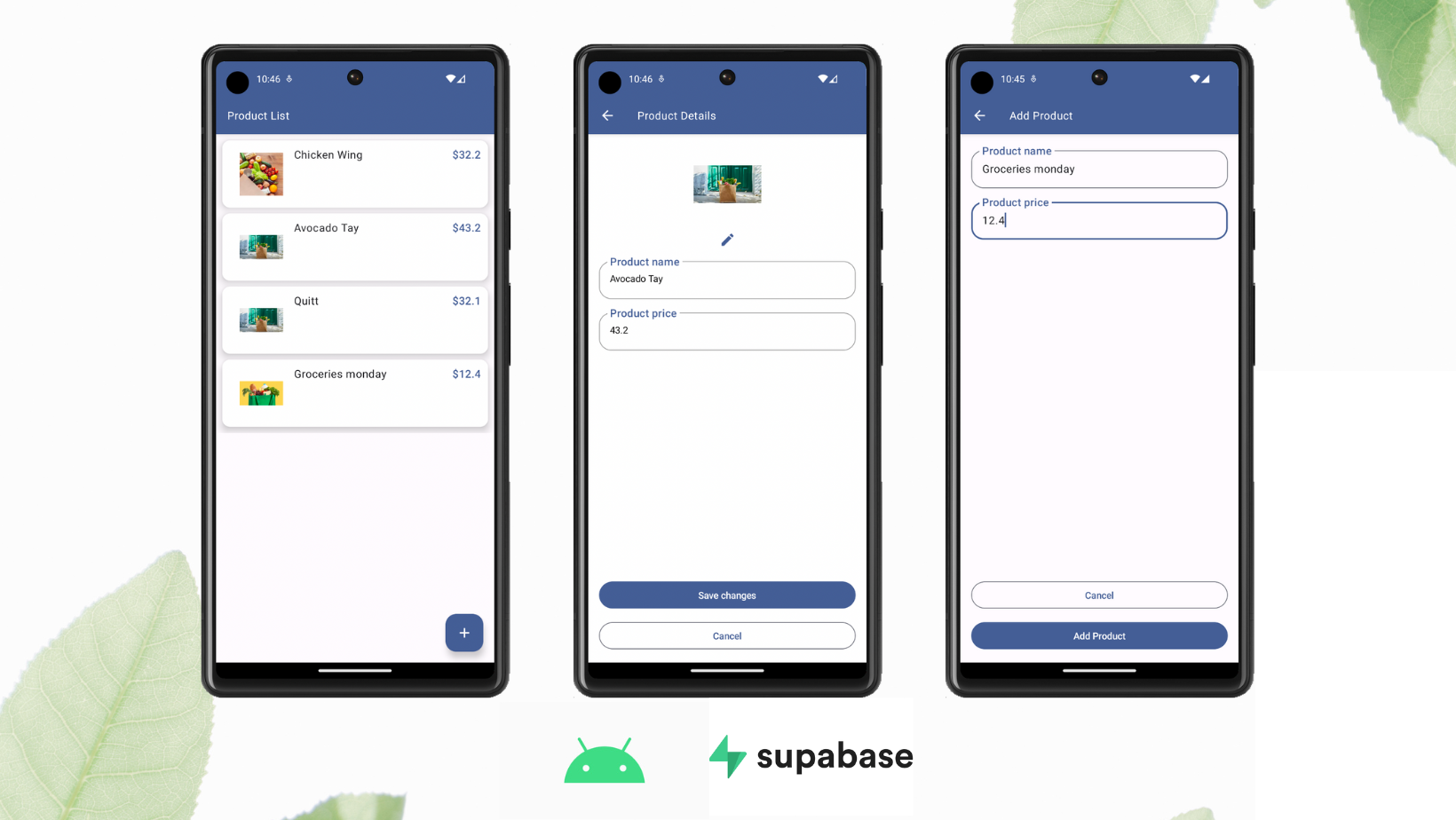
If you get stuck while working through this guide, refer to the full example on GitHub.
Project setup#
Before building, you must set up your Database and API with a new Project in Supabase and then create a "schema" inside the database.
Create a project#
- Create a new project in the Supabase Dashboard.
- Enter your project details.
- Wait for the new database to launch.
Set up the database schema#
Now we are going to set up the database schema. You can copy/paste the SQL from below and run it yourself.
-- Create a table for public profilescreate table public.products ( id uuid not null default gen_random_uuid (), name text not null, price real not null, image text null, constraint products_pkey primary key (id) ) tablespace pg_default;-- Set up Storage!insert into storage.buckets (id, name) values ('Product Image', 'Product Image');-- Set up access controls for storage.-- See https://supabase.com/docs/guides/storage/security/access-control#policy-examples for more details.CREATE POLICY "Enable read access for all users" ON "storage"."objects"AS PERMISSIVE FOR SELECTTO publicUSING (true)CREATE POLICY "Enable insert for all users" ON "storage"."objects"AS PERMISSIVE FOR INSERTTO authenticated, anonWITH CHECK (true)CREATE POLICY "Enable update for all users" ON "storage"."objects"AS PERMISSIVE FOR UPDATETO publicUSING (true)WITH CHECK (true)Get API details#
To interact with data in database tables, you use the client libraries that wrap the auto-generated Data API endpoints, authenticating using the Project URL and key from the project Connect dialog.
See API keys for a full explanation of all key types, their uses, and where to find them.
Set up Google authentication#
From the Google Console, create a new project and add OAuth2 credentials.
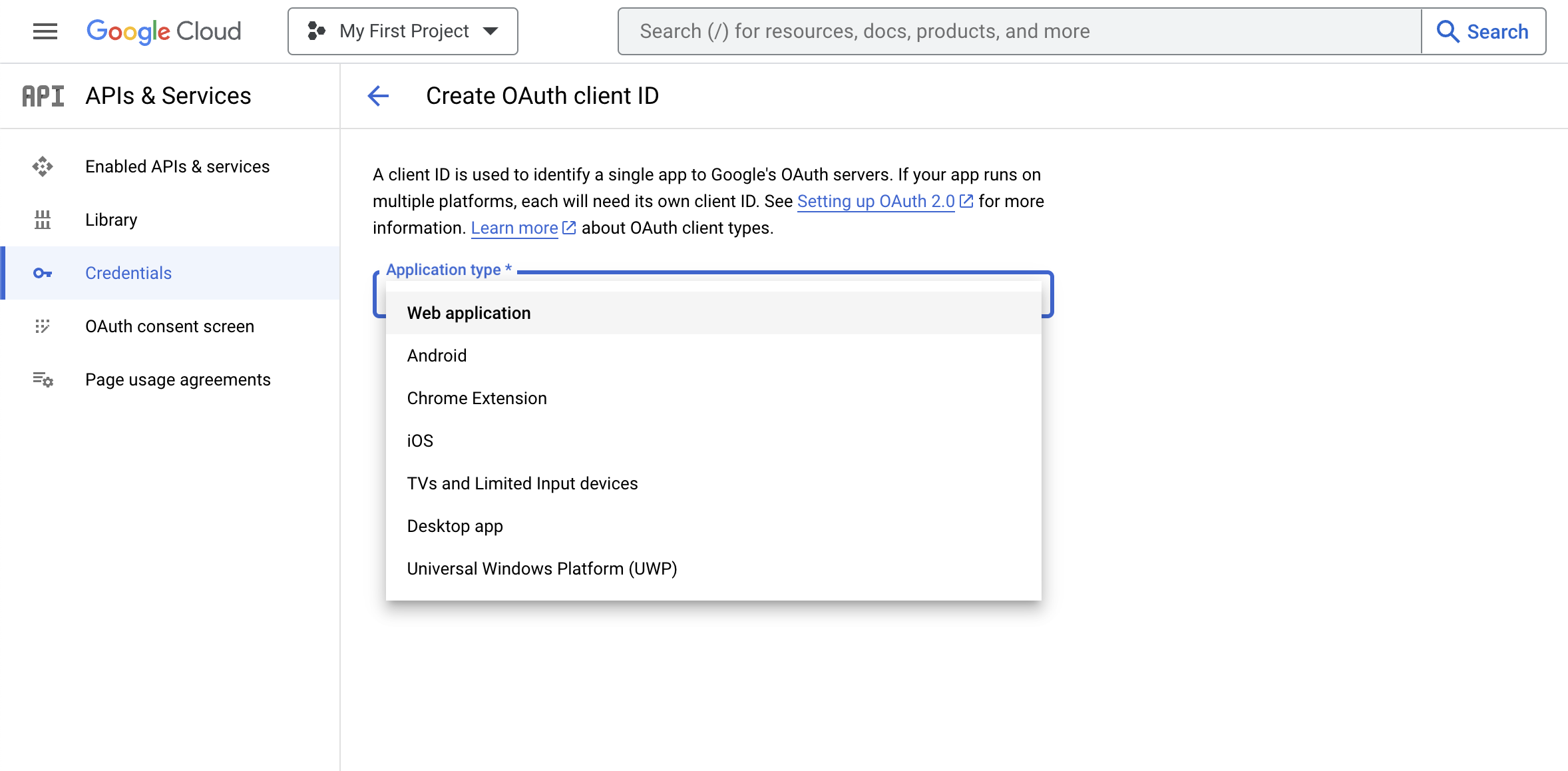
In your Supabase Auth settings enable Google as a provider and set the required credentials as outlined in the auth docs.
Building the app#
Create new Android project#
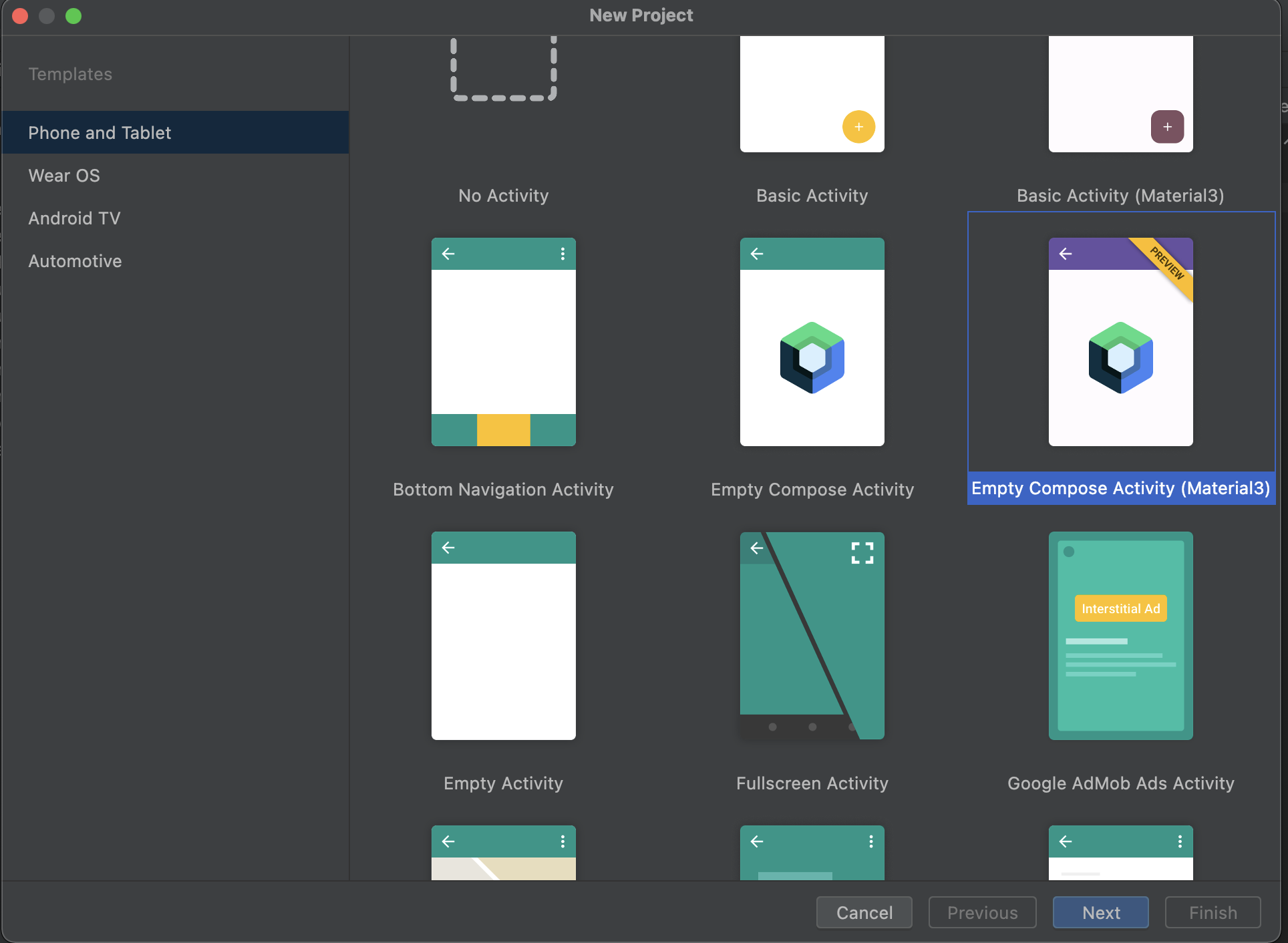
Open Android Studio > New Project > Base Activity (Jetpack Compose).
Set up API key and secret securely#
Create local environment secret#
Create or edit the local.properties file at the root (same level as build.gradle) of your project.
Note: Do not commit this file to your source control, for example, by adding it to your
.gitignorefile!
SUPABASE_PUBLISHABLE_KEY=YOUR_SUPABASE_PUBLISHABLE_KEYSUPABASE_URL=YOUR_SUPABASE_URLRead and set value to BuildConfig#
In your build.gradle (app) file, create a Properties object and read the values from your local.properties file by calling the buildConfigField method:
defaultConfig { applicationId "com.example.manageproducts" minSdkVersion 22 targetSdkVersion 33 versionCode 5 versionName "1.0" testInstrumentationRunner "androidx.test.runner.AndroidJUnitRunner" // Set value part Properties properties = new Properties() properties.load(project.rootProject.file("local.properties").newDataInputStream()) buildConfigField("String", "SUPABASE_PUBLISHABLE_KEY", "\"${properties.getProperty("SUPABASE_PUBLISHABLE_KEY")}\"") buildConfigField("String", "SECRET", "\"${properties.getProperty("SECRET")}\"") buildConfigField("String", "SUPABASE_URL", "\"${properties.getProperty("SUPABASE_URL")}\"")}Use value from BuildConfig#
Read the value from BuildConfig:
val url = BuildConfig.SUPABASE_URLval apiKey = BuildConfig.SUPABASE_PUBLISHABLE_KEYSet up Supabase dependencies#
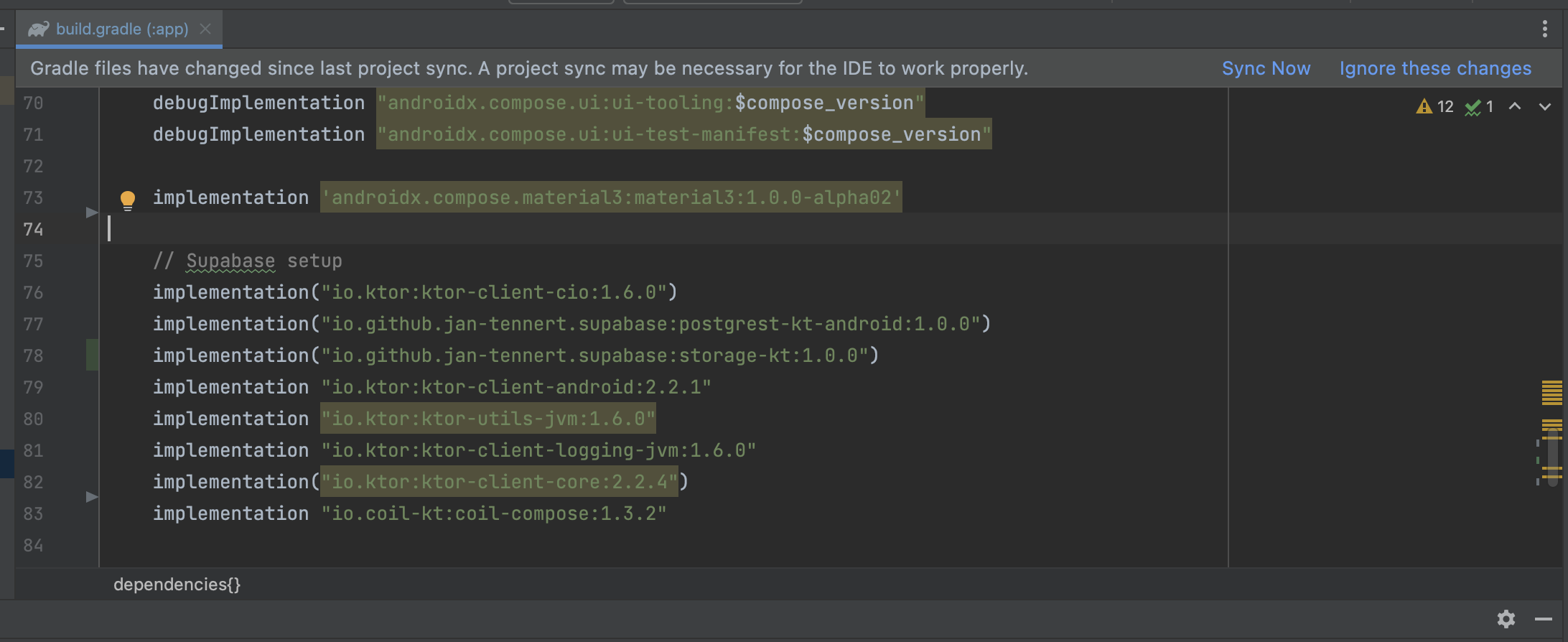
In the build.gradle (app) file, add these dependencies then press "Sync now." Replace the dependency version placeholders $supabase_version and $ktor_version with their respective latest versions.
implementation "io.github.jan-tennert.supabase:postgrest-kt:$supabase_version"implementation "io.github.jan-tennert.supabase:storage-kt:$supabase_version"implementation "io.github.jan-tennert.supabase:auth-kt:$supabase_version"implementation "io.ktor:ktor-client-android:$ktor_version"implementation "io.ktor:ktor-client-core:$ktor_version"implementation "io.ktor:ktor-utils:$ktor_version"Also in the build.gradle (app) file, add the plugin for serialization. The version of this plugin should be the same as your Kotlin version.
plugins { ... id 'org.jetbrains.kotlin.plugin.serialization' version '$kotlin_version' ...}Set up Hilt for dependency injection#
In the build.gradle (app) file, add the following:
implementation "com.google.dagger:hilt-android:$hilt_version"annotationProcessor "com.google.dagger:hilt-compiler:$hilt_version"implementation("androidx.hilt:hilt-navigation-compose:1.0.0")Create a new ManageProductApplication.kt class extending Application with @HiltAndroidApp annotation:
// ManageProductApplication.kt@HiltAndroidAppclass ManageProductApplication: Application()Open the AndroidManifest.xml file, update name property of Application tag:
<application... android:name=".ManageProductApplication"...</application>Create the MainActivity:
@AndroidEntryPointclass MainActivity : ComponentActivity() { //This will come later}Provide Supabase instances with Hilt#
To make the app easier to test, create a SupabaseModule.kt file as follows:
@InstallIn(SingletonComponent::class)@Moduleobject SupabaseModule { @Provides @Singleton fun provideSupabaseClient(): SupabaseClient { return createSupabaseClient( supabaseUrl = BuildConfig.SUPABASE_URL, supabaseKey = BuildConfig.SUPABASE_PUBLISHABLE_KEY ) { install(Postgrest) install(Auth) { flowType = FlowType.PKCE scheme = "app" host = "supabase.com" } install(Storage) } } @Provides @Singleton fun provideSupabaseDatabase(client: SupabaseClient): Postgrest { return client.postgrest } @Provides @Singleton fun provideSupabaseAuth(client: SupabaseClient): Auth { return client.auth } @Provides @Singleton fun provideSupabaseStorage(client: SupabaseClient): Storage { return client.storage }}Create a data transfer object#
Create a ProductDto.kt class and use annotations to parse data from Supabase:
@Serializabledata class ProductDto( @SerialName("name") val name: String, @SerialName("price") val price: Double, @SerialName("image") val image: String?, @SerialName("id") val id: String,)Create a Domain object in Product.kt expose the data in your view:
data class Product( val id: String, val name: String, val price: Double, val image: String?)Implement repositories#
Create a ProductRepository interface and its implementation named ProductRepositoryImpl. This holds the logic to interact with data sources from Supabase. Do the same with the AuthenticationRepository.
Create the Product Repository:
interface ProductRepository { suspend fun createProduct(product: Product): Boolean suspend fun getProducts(): List<ProductDto>? suspend fun getProduct(id: String): ProductDto suspend fun deleteProduct(id: String) suspend fun updateProduct( id: String, name: String, price: Double, imageName: String, imageFile: ByteArray )}class ProductRepositoryImpl @Inject constructor( private val postgrest: Postgrest, private val storage: Storage,) : ProductRepository { override suspend fun createProduct(product: Product): Boolean { return try { withContext(Dispatchers.IO) { val productDto = ProductDto( name = product.name, price = product.price, ) postgrest.from("products").insert(productDto) true } true } catch (e: java.lang.Exception) { throw e } } override suspend fun getProducts(): List<ProductDto>? { return withContext(Dispatchers.IO) { val result = postgrest.from("products") .select().decodeList<ProductDto>() result } } override suspend fun getProduct(id: String): ProductDto { return withContext(Dispatchers.IO) { postgrest.from("products").select { filter { eq("id", id) } }.decodeSingle<ProductDto>() } } override suspend fun deleteProduct(id: String) { return withContext(Dispatchers.IO) { postgrest.from("products").delete { filter { eq("id", id) } } } } override suspend fun updateProduct( id: String, name: String, price: Double, imageName: String, imageFile: ByteArray ) { withContext(Dispatchers.IO) { if (imageFile.isNotEmpty()) { val imageUrl = storage.from("Product%20Image").upload( path = "$imageName.png", data = imageFile, upsert = true ) postgrest.from("products").update({ set("name", name) set("price", price) set("image", buildImageUrl(imageFileName = imageUrl)) }) { filter { eq("id", id) } } } else { postgrest.from("products").update({ set("name", name) set("price", price) }) { filter { eq("id", id) } } } } } // Because I named the bucket as "Product Image" so when it turns to an url, it is "%20" // For better approach, you should create your bucket name without space symbol private fun buildImageUrl(imageFileName: String) = "${BuildConfig.SUPABASE_URL}/storage/v1/object/public/${imageFileName}".replace(" ", "%20")}Create the Authentication Repository:
interface AuthenticationRepository { suspend fun signIn(email: String, password: String): Boolean suspend fun signUp(email: String, password: String): Boolean suspend fun signInWithGoogle(): Boolean}class AuthenticationRepositoryImpl @Inject constructor( private val auth: Auth) : AuthenticationRepository { override suspend fun signIn(email: String, password: String): Boolean { return try { auth.signInWith(Email) { this.email = email this.password = password } true } catch (e: Exception) { false } } override suspend fun signUp(email: String, password: String): Boolean { return try { auth.signUpWith(Email) { this.email = email this.password = password } true } catch (e: Exception) { false } } override suspend fun signInWithGoogle(): Boolean { return try { auth.signInWith(Google) true } catch (e: Exception) { false } }}Implement screens#
To navigate screens, use the AndroidX navigation library. For routes, implement a Destination interface:
interface Destination { val route: String val title: String}object ProductListDestination : Destination { override val route = "product_list" override val title = "Product List"}object ProductDetailsDestination : Destination { override val route = "product_details" override val title = "Product Details" const val productId = "product_id" val arguments = listOf(navArgument(name = productId) { type = NavType.StringType }) fun createRouteWithParam(productId: String) = "$route/${productId}"}object AddProductDestination : Destination { override val route = "add_product" override val title = "Add Product"}object AuthenticationDestination: Destination { override val route = "authentication" override val title = "Authentication"}object SignUpDestination: Destination { override val route = "signup" override val title = "Sign Up"}This will help later for navigating between screens.
Create a ProductListViewModel:
@HiltViewModelclass ProductListViewModel @Inject constructor(private val productRepository: ProductRepository,) : ViewModel() { private val _productList = MutableStateFlow<List<Product>?>(listOf()) val productList: Flow<List<Product>?> = _productList private val _isLoading = MutableStateFlow(false) val isLoading: Flow<Boolean> = _isLoading init { getProducts() } fun getProducts() { viewModelScope.launch { val products = productRepository.getProducts() _productList.emit(products?.map { it -> it.asDomainModel() }) } } fun removeItem(product: Product) { viewModelScope.launch { val newList = mutableListOf<Product>().apply { _productList.value?.let { addAll(it) } } newList.remove(product) _productList.emit(newList.toList()) // Call api to remove productRepository.deleteProduct(id = product.id) // Then fetch again getProducts() } } private fun ProductDto.asDomainModel(): Product { return Product( id = this.id, name = this.name, price = this.price, image = this.image ) }}Create the ProductListScreen.kt:
@OptIn(ExperimentalMaterial3Api::class, ExperimentalMaterialApi::class)@Composablefun ProductListScreen( modifier: Modifier = Modifier, navController: NavController, viewModel: ProductListViewModel = hiltViewModel(),) { val isLoading by viewModel.isLoading.collectAsState(initial = false) val swipeRefreshState = rememberSwipeRefreshState(isRefreshing = isLoading) SwipeRefresh(state = swipeRefreshState, onRefresh = { viewModel.getProducts() }) { Scaffold( topBar = { TopAppBar( backgroundColor = MaterialTheme.colorScheme.primary, title = { Text( text = stringResource(R.string.product_list_text_screen_title), color = MaterialTheme.colorScheme.onPrimary, ) }, ) }, floatingActionButton = { AddProductButton(onClick = { navController.navigate(AddProductDestination.route) }) } ) { padding -> val productList = viewModel.productList.collectAsState(initial = listOf()).value if (!productList.isNullOrEmpty()) { LazyColumn( modifier = modifier.padding(padding), contentPadding = PaddingValues(5.dp) ) { itemsIndexed( items = productList, key = { _, product -> product.name }) { _, item -> val state = rememberDismissState( confirmStateChange = { if (it == DismissValue.DismissedToStart) { // Handle item removed viewModel.removeItem(item) } true } ) SwipeToDismiss( state = state, background = { val color by animateColorAsState( targetValue = when (state.dismissDirection) { DismissDirection.StartToEnd -> MaterialTheme.colorScheme.primary DismissDirection.EndToStart -> MaterialTheme.colorScheme.primary.copy( alpha = 0.2f ) null -> Color.Transparent } ) Box( modifier = modifier .fillMaxSize() .background(color = color) .padding(16.dp), ) { Icon( imageVector = Icons.Filled.Delete, contentDescription = null, tint = MaterialTheme.colorScheme.primary, modifier = modifier.align(Alignment.CenterEnd) ) } }, dismissContent = { ProductListItem( product = item, modifier = modifier, onClick = { navController.navigate( ProductDetailsDestination.createRouteWithParam( item.id ) ) }, ) }, directions = setOf(DismissDirection.EndToStart), ) } } } else { Text("Product list is empty!") } } }}@Composableprivate fun AddProductButton( modifier: Modifier = Modifier, onClick: () -> Unit,) { FloatingActionButton( modifier = modifier, onClick = onClick, containerColor = MaterialTheme.colorScheme.primary, contentColor = MaterialTheme.colorScheme.onPrimary ) { Icon( imageVector = Icons.Filled.Add, contentDescription = null, ) }}Create the ProductDetailsViewModel.kt:
@HiltViewModelclass ProductDetailsViewModel @Inject constructor( private val productRepository: ProductRepository, savedStateHandle: SavedStateHandle, ) : ViewModel() { private val _product = MutableStateFlow<Product?>(null) val product: Flow<Product?> = _product private val _name = MutableStateFlow("") val name: Flow<String> = _name private val _price = MutableStateFlow(0.0) val price: Flow<Double> = _price private val _imageUrl = MutableStateFlow("") val imageUrl: Flow<String> = _imageUrl init { val productId = savedStateHandle.get<String>(ProductDetailsDestination.productId) productId?.let { getProduct(productId = it) } } private fun getProduct(productId: String) { viewModelScope.launch { val result = productRepository.getProduct(productId).asDomainModel() _product.emit(result) _name.emit(result.name) _price.emit(result.price) } } fun onNameChange(name: String) { _name.value = name } fun onPriceChange(price: Double) { _price.value = price } fun onSaveProduct(image: ByteArray) { viewModelScope.launch { productRepository.updateProduct( id = _product.value?.id, price = _price.value, name = _name.value, imageFile = image, imageName = "image_${_product.value.id}", ) } } fun onImageChange(url: String) { _imageUrl.value = url } private fun ProductDto.asDomainModel(): Product { return Product( id = this.id, name = this.name, price = this.price, image = this.image ) }}Create the ProductDetailsScreen.kt:
@OptIn(ExperimentalCoilApi::class)@SuppressLint("UnusedMaterialScaffoldPaddingParameter")@Composablefun ProductDetailsScreen( modifier: Modifier = Modifier, viewModel: ProductDetailsViewModel = hiltViewModel(), navController: NavController, productId: String?,) { val snackBarHostState = remember { SnackbarHostState() } val coroutineScope = rememberCoroutineScope() Scaffold( snackbarHost = { SnackbarHost(snackBarHostState) }, topBar = { TopAppBar( navigationIcon = { IconButton(onClick = { navController.navigateUp() }) { Icon( imageVector = Icons.Filled.ArrowBack, contentDescription = null, tint = MaterialTheme.colorScheme.onPrimary ) } }, backgroundColor = MaterialTheme.colorScheme.primary, title = { Text( text = stringResource(R.string.product_details_text_screen_title), color = MaterialTheme.colorScheme.onPrimary, ) }, ) } ) { val name = viewModel.name.collectAsState(initial = "") val price = viewModel.price.collectAsState(initial = 0.0) var imageUrl = Uri.parse(viewModel.imageUrl.collectAsState(initial = null).value) val contentResolver = LocalContext.current.contentResolver Column( modifier = modifier .padding(16.dp) .fillMaxSize() ) { val galleryLauncher = rememberLauncherForActivityResult(ActivityResultContracts.GetContent()) { uri -> uri?.let { if (it.toString() != imageUrl.toString()) { viewModel.onImageChange(it.toString()) } } } Image( painter = rememberImagePainter(imageUrl), contentScale = ContentScale.Fit, contentDescription = null, modifier = Modifier .padding(16.dp, 8.dp) .size(100.dp) .align(Alignment.CenterHorizontally) ) IconButton(modifier = modifier.align(alignment = Alignment.CenterHorizontally), onClick = { galleryLauncher.launch("image/*") }) { Icon( imageVector = Icons.Filled.Edit, contentDescription = null, tint = MaterialTheme.colorScheme.primary ) } OutlinedTextField( label = { Text( text = "Product name", color = MaterialTheme.colorScheme.primary, style = MaterialTheme.typography.titleMedium ) }, maxLines = 2, shape = RoundedCornerShape(32), modifier = modifier.fillMaxWidth(), value = name.value, onValueChange = { viewModel.onNameChange(it) }, ) Spacer(modifier = modifier.height(12.dp)) OutlinedTextField( label = { Text( text = "Product price", color = MaterialTheme.colorScheme.primary, style = MaterialTheme.typography.titleMedium ) }, maxLines = 2, shape = RoundedCornerShape(32), modifier = modifier.fillMaxWidth(), value = price.value.toString(), keyboardOptions = KeyboardOptions(keyboardType = KeyboardType.Number), onValueChange = { viewModel.onPriceChange(it.toDouble()) }, ) Spacer(modifier = modifier.weight(1f)) Button( modifier = modifier.fillMaxWidth(), onClick = { if (imageUrl.host?.contains("supabase") == true) { viewModel.onSaveProduct(image = byteArrayOf()) } else { val image = uriToByteArray(contentResolver, imageUrl) viewModel.onSaveProduct(image = image) } coroutineScope.launch { snackBarHostState.showSnackbar( message = "Product updated successfully !", duration = SnackbarDuration.Short ) } }) { Text(text = "Save changes") } Spacer(modifier = modifier.height(12.dp)) OutlinedButton( modifier = modifier .fillMaxWidth(), onClick = { navController.navigateUp() }) { Text(text = "Cancel") } } }}private fun getBytes(inputStream: InputStream): ByteArray { val byteBuffer = ByteArrayOutputStream() val bufferSize = 1024 val buffer = ByteArray(bufferSize) var len = 0 while (inputStream.read(buffer).also { len = it } != -1) { byteBuffer.write(buffer, 0, len) } return byteBuffer.toByteArray()}private fun uriToByteArray(contentResolver: ContentResolver, uri: Uri): ByteArray { if (uri == Uri.EMPTY) { return byteArrayOf() } val inputStream = contentResolver.openInputStream(uri) if (inputStream != null) { return getBytes(inputStream) } return byteArrayOf()}Create a AddProductScreen:
@SuppressLint("UnusedMaterial3ScaffoldPaddingParameter")@OptIn(ExperimentalMaterial3Api::class)@Composablefun AddProductScreen( modifier: Modifier = Modifier, navController: NavController, viewModel: AddProductViewModel = hiltViewModel(),) { Scaffold( topBar = { TopAppBar( navigationIcon = { IconButton(onClick = { navController.navigateUp() }) { Icon( imageVector = Icons.Filled.ArrowBack, contentDescription = null, tint = MaterialTheme.colorScheme.onPrimary ) } }, backgroundColor = MaterialTheme.colorScheme.primary, title = { Text( text = stringResource(R.string.add_product_text_screen_title), color = MaterialTheme.colorScheme.onPrimary, ) }, ) } ) { padding -> val navigateAddProductSuccess = viewModel.navigateAddProductSuccess.collectAsState(initial = null).value val isLoading = viewModel.isLoading.collectAsState(initial = null).value if (isLoading == true) { LoadingScreen(message = "Adding Product", onCancelSelected = { navController.navigateUp() }) } else { SuccessScreen( message = "Product added", onMoreAction = { viewModel.onAddMoreProductSelected() }, onNavigateBack = { navController.navigateUp() }) } }}Create the AddProductViewModel.kt:
@HiltViewModelclass AddProductViewModel @Inject constructor( private val productRepository: ProductRepository,) : ViewModel() { private val _isLoading = MutableStateFlow(false) val isLoading: Flow<Boolean> = _isLoading private val _showSuccessMessage = MutableStateFlow(false) val showSuccessMessage: Flow<Boolean> = _showSuccessMessage fun onCreateProduct(name: String, price: Double) { if (name.isEmpty() || price <= 0) return viewModelScope.launch { _isLoading.value = true val product = Product( id = UUID.randomUUID().toString(), name = name, price = price, ) productRepository.createProduct(product = product) _isLoading.value = false _showSuccessMessage.emit(true) } }}Create a SignUpViewModel:
@HiltViewModelclass SignUpViewModel @Inject constructor( private val authenticationRepository: AuthenticationRepository) : ViewModel() { private val _email = MutableStateFlow("") val email: Flow<String> = _email private val _password = MutableStateFlow("") val password = _password fun onEmailChange(email: String) { _email.value = email } fun onPasswordChange(password: String) { _password.value = password } fun onSignUp() { viewModelScope.launch { authenticationRepository.signUp( email = _email.value, password = _password.value ) } }}Create the SignUpScreen.kt:
@Composablefun SignUpScreen( modifier: Modifier = Modifier, navController: NavController, viewModel: SignUpViewModel = hiltViewModel()) { val snackBarHostState = remember { SnackbarHostState() } val coroutineScope = rememberCoroutineScope() Scaffold( snackbarHost = { androidx.compose.material.SnackbarHost(snackBarHostState) }, topBar = { TopAppBar( navigationIcon = { IconButton(onClick = { navController.navigateUp() }) { Icon( imageVector = Icons.Filled.ArrowBack, contentDescription = null, tint = MaterialTheme.colorScheme.onPrimary ) } }, backgroundColor = MaterialTheme.colorScheme.primary, title = { Text( text = "Sign Up", color = MaterialTheme.colorScheme.onPrimary, ) }, ) } ) { paddingValues -> Column( modifier = modifier .padding(paddingValues) .padding(20.dp) ) { val email = viewModel.email.collectAsState(initial = "") val password = viewModel.password.collectAsState() OutlinedTextField( label = { Text( text = "Email", color = MaterialTheme.colorScheme.primary, style = MaterialTheme.typography.titleMedium ) }, maxLines = 1, shape = RoundedCornerShape(32), modifier = modifier.fillMaxWidth(), value = email.value, onValueChange = { viewModel.onEmailChange(it) }, ) OutlinedTextField( label = { Text( text = "Password", color = MaterialTheme.colorScheme.primary, style = MaterialTheme.typography.titleMedium ) }, maxLines = 1, shape = RoundedCornerShape(32), modifier = modifier .fillMaxWidth() .padding(top = 12.dp), value = password.value, onValueChange = { viewModel.onPasswordChange(it) }, ) val localSoftwareKeyboardController = LocalSoftwareKeyboardController.current Button(modifier = modifier .fillMaxWidth() .padding(top = 12.dp), onClick = { localSoftwareKeyboardController?.hide() viewModel.onSignUp() coroutineScope.launch { snackBarHostState.showSnackbar( message = "Create account successfully. Sign in now!", duration = SnackbarDuration.Long ) } }) { Text("Sign up") } } }}Create a SignInViewModel:
@HiltViewModelclass SignInViewModel @Inject constructor( private val authenticationRepository: AuthenticationRepository) : ViewModel() { private val _email = MutableStateFlow("") val email: Flow<String> = _email private val _password = MutableStateFlow("") val password = _password fun onEmailChange(email: String) { _email.value = email } fun onPasswordChange(password: String) { _password.value = password } fun onSignIn() { viewModelScope.launch { authenticationRepository.signIn( email = _email.value, password = _password.value ) } } fun onGoogleSignIn() { viewModelScope.launch { authenticationRepository.signInWithGoogle() } }}Create the SignInScreen.kt:
@OptIn(ExperimentalMaterial3Api::class, ExperimentalComposeUiApi::class)@Composablefun SignInScreen( modifier: Modifier = Modifier, navController: NavController, viewModel: SignInViewModel = hiltViewModel()) { val snackBarHostState = remember { SnackbarHostState() } val coroutineScope = rememberCoroutineScope() Scaffold( snackbarHost = { androidx.compose.material.SnackbarHost(snackBarHostState) }, topBar = { TopAppBar( navigationIcon = { IconButton(onClick = { navController.navigateUp() }) { Icon( imageVector = Icons.Filled.ArrowBack, contentDescription = null, tint = MaterialTheme.colorScheme.onPrimary ) } }, backgroundColor = MaterialTheme.colorScheme.primary, title = { Text( text = "Login", color = MaterialTheme.colorScheme.onPrimary, ) }, ) } ) { paddingValues -> Column( modifier = modifier .padding(paddingValues) .padding(20.dp) ) { val email = viewModel.email.collectAsState(initial = "") val password = viewModel.password.collectAsState() androidx.compose.material.OutlinedTextField( label = { Text( text = "Email", color = MaterialTheme.colorScheme.primary, style = MaterialTheme.typography.titleMedium ) }, maxLines = 1, shape = RoundedCornerShape(32), modifier = modifier.fillMaxWidth(), value = email.value, onValueChange = { viewModel.onEmailChange(it) }, ) androidx.compose.material.OutlinedTextField( label = { Text( text = "Password", color = MaterialTheme.colorScheme.primary, style = MaterialTheme.typography.titleMedium ) }, maxLines = 1, shape = RoundedCornerShape(32), modifier = modifier .fillMaxWidth() .padding(top = 12.dp), value = password.value, onValueChange = { viewModel.onPasswordChange(it) }, ) val localSoftwareKeyboardController = LocalSoftwareKeyboardController.current Button(modifier = modifier .fillMaxWidth() .padding(top = 12.dp), onClick = { localSoftwareKeyboardController?.hide() viewModel.onGoogleSignIn() }) { Text("Sign in with Google") } Button(modifier = modifier .fillMaxWidth() .padding(top = 12.dp), onClick = { localSoftwareKeyboardController?.hide() viewModel.onSignIn() coroutineScope.launch { snackBarHostState.showSnackbar( message = "Sign in successfully !", duration = SnackbarDuration.Long ) } }) { Text("Sign in") } OutlinedButton(modifier = modifier .fillMaxWidth() .padding(top = 12.dp), onClick = { navController.navigate(SignUpDestination.route) }) { Text("Sign up") } } }}Implement the MainActivity#
In the MainActivity you created earlier, show your newly created screens:
@AndroidEntryPointclass MainActivity : ComponentActivity() { @Inject lateinit var supabaseClient: SupabaseClient @OptIn(ExperimentalMaterial3Api::class) override fun onCreate(savedInstanceState: Bundle?) { super.onCreate(savedInstanceState) setContent { ManageProductsTheme { // A surface container using the 'background' color from the theme val navController = rememberNavController() val currentBackStack by navController.currentBackStackEntryAsState() val currentDestination = currentBackStack?.destination Scaffold { innerPadding -> NavHost( navController, startDestination = ProductListDestination.route, Modifier.padding(innerPadding) ) { composable(ProductListDestination.route) { ProductListScreen( navController = navController ) } composable(AuthenticationDestination.route) { SignInScreen( navController = navController ) } composable(SignUpDestination.route) { SignUpScreen( navController = navController ) } composable(AddProductDestination.route) { AddProductScreen( navController = navController ) } composable( route = "${ProductDetailsDestination.route}/{${ProductDetailsDestination.productId}}", arguments = ProductDetailsDestination.arguments ) { navBackStackEntry -> val productId = navBackStackEntry.arguments?.getString(ProductDetailsDestination.productId) ProductDetailsScreen( productId = productId, navController = navController, ) } } } } } }}Create the success screen#
To handle OAuth and OTP signins, create a new activity to handle the deep link you set in AndroidManifest.xml:
<?xml version="1.0" encoding="utf-8"?><manifest xmlns:android="http://schemas.android.com/apk/res/android" xmlns:tools="http://schemas.android.com/tools"> <uses-permission android:name="android.permission.INTERNET" /> <application android:name=".ManageProductApplication" android:allowBackup="true" android:dataExtractionRules="@xml/data_extraction_rules" android:enableOnBackInvokedCallback="true" android:fullBackupContent="@xml/backup_rules" android:icon="@mipmap/ic_launcher" android:label="@string/app_name" android:supportsRtl="true" android:theme="@style/Theme.ManageProducts" tools:targetApi="31"> <activity android:name=".DeepLinkHandlerActivity" android:exported="true" android:theme="@style/Theme.ManageProducts" > <intent-filter android:autoVerify="true"> <action android:name="android.intent.action.VIEW" /> <category android:name="android.intent.category.DEFAULT" /> <category android:name="android.intent.category.BROWSABLE" /> <data android:host="supabase.com" android:scheme="app" /> </intent-filter> </activity> <activity android:name=".MainActivity" android:exported="true" android:label="@string/app_name" android:theme="@style/Theme.ManageProducts"> <intent-filter> <action android:name="android.intent.action.MAIN" /> <category android:name="android.intent.category.LAUNCHER" /> </intent-filter> </activity> </application></manifest>Then create the DeepLinkHandlerActivity:
@AndroidEntryPointclass DeepLinkHandlerActivity : ComponentActivity() { @Inject lateinit var supabaseClient: SupabaseClient private lateinit var callback: (String, String) -> Unit override fun onCreate(savedInstanceState: Bundle?) { super.onCreate(savedInstanceState) supabaseClient.handleDeeplinks(intent = intent, onSessionSuccess = { userSession -> Log.d("LOGIN", "Log in successfully with user info: ${userSession.user}") userSession.user?.apply { callback(email ?: "", createdAt.toString()) } }) setContent { val navController = rememberNavController() val emailState = remember { mutableStateOf("") } val createdAtState = remember { mutableStateOf("") } LaunchedEffect(Unit) { callback = { email, created -> emailState.value = email createdAtState.value = created } } ManageProductsTheme { Surface( modifier = Modifier.fillMaxSize(), color = MaterialTheme.colorScheme.background ) { SignInSuccessScreen( modifier = Modifier.padding(20.dp), navController = navController, email = emailState.value, createdAt = createdAtState.value, onClick = { navigateToMainApp() } ) } } } } private fun navigateToMainApp() { val intent = Intent(this, MainActivity::class.java).apply { flags = Intent.FLAG_ACTIVITY_CLEAR_TOP } startActivity(intent) }}