Build a User Management App with Flutter
This tutorial demonstrates how to build a basic user management app. The app authenticates and identifies the user, stores their profile information in the database, and allows the user to log in, update their profile details, and upload a profile photo. The app uses:
- Supabase Database - a Postgres database for storing your user data and Row Level Security so data is protected and users can only access their own information.
- Supabase Auth - allow users to sign up and log in.
- Supabase Storage - allow users to upload a profile photo.
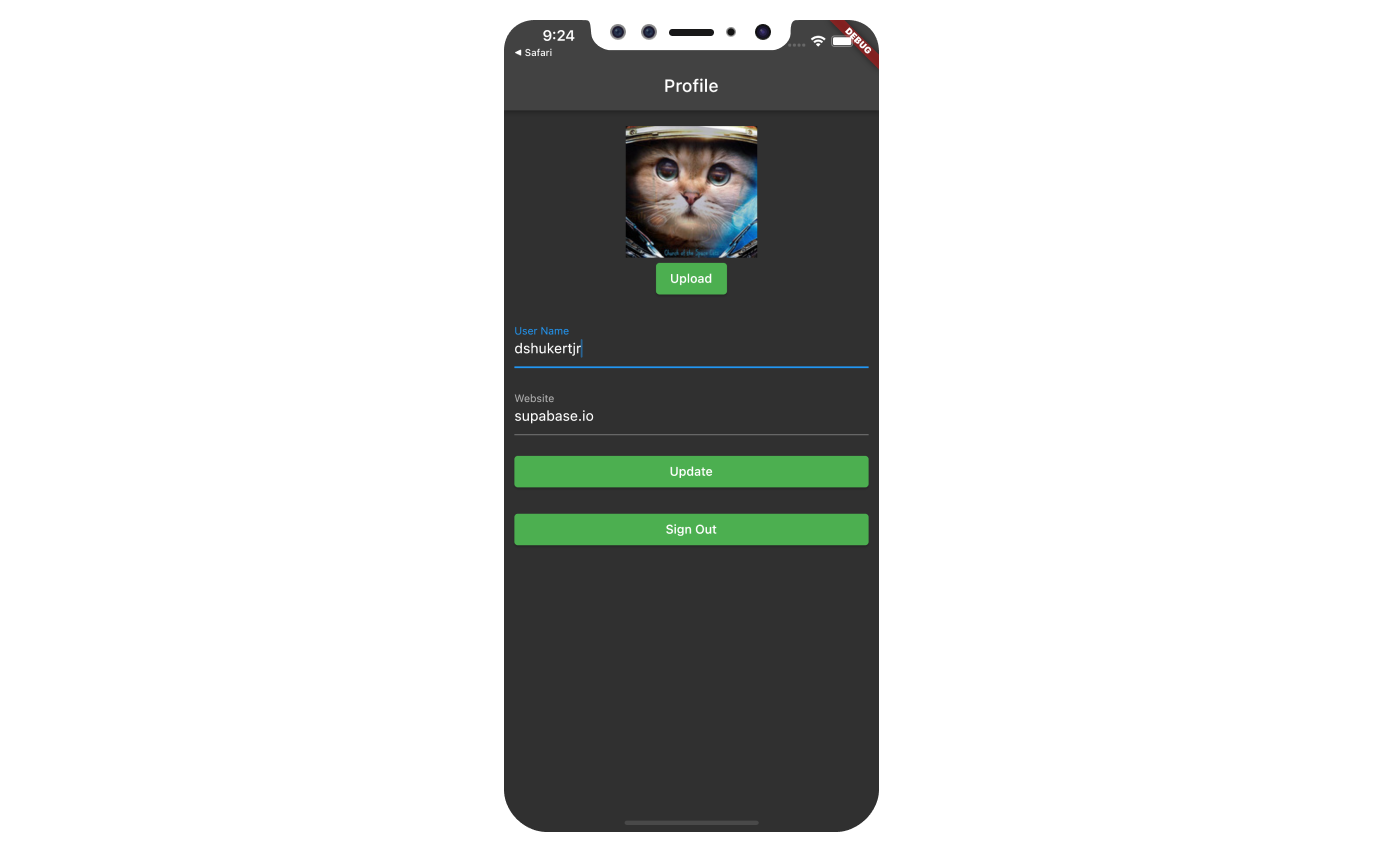
If you get stuck while working through this guide, refer to the full example on GitHub.
Project setup#
Before you start building you need to set up the Database and API. You can do this by starting a new Project in Supabase and then creating a "schema" inside the database.
Create a project#
- Create a new project in the Supabase Dashboard.
- Enter your project details.
- Wait for the new database to launch.
Set up the database schema#
Now set up the database schema. You can use the "User Management Starter" quickstart in the SQL Editor, or you can copy/paste the SQL from below and run it.
- Go to the SQL Editor page in the Dashboard.
- Click User Management Starter under the Reference > Examples tab.
- Click Run.
You can pull the database schema down to your local project by running the db pull command. Read the local development docs for detailed instructions.
supabase link --project-ref <project-id># You can get <project-id> from your project's dashboard URL: https://supabase.com/dashboard/project/<project-id>supabase db pullGet API details#
To interact with data in database tables, you use the client libraries that wrap the auto-generated Data API endpoints, authenticating using the Project URL and key from the project Connect dialog.
See API keys for a full explanation of all key types, their uses, and where to find them.
Building the app#
Build the Flutter app from scratch.
Initialize a Flutter app#
We can use flutter create to initialize
an app called supabase_quickstart:
flutter create supabase_quickstartThen install the only additional dependency: supabase_flutter
Copy and paste the following line in your pubspec.yaml to install the package:
supabase_flutter: ^2.0.0Run flutter pub get to install the dependencies.
Setup deep links#
With dependencies installed, set up deep links. Setting up deep links is required to bring back the user to the app when they click on the magic link to sign in. We can setup deep links with a minor tweak on our Flutter application.
We have to use io.supabase.flutterquickstart as the scheme. In this example, we will use login-callback as the host for our deep link, but you can change it to whatever you would like.
First, add io.supabase.flutterquickstart://login-callback/ as a new redirect URL in the Dashboard.
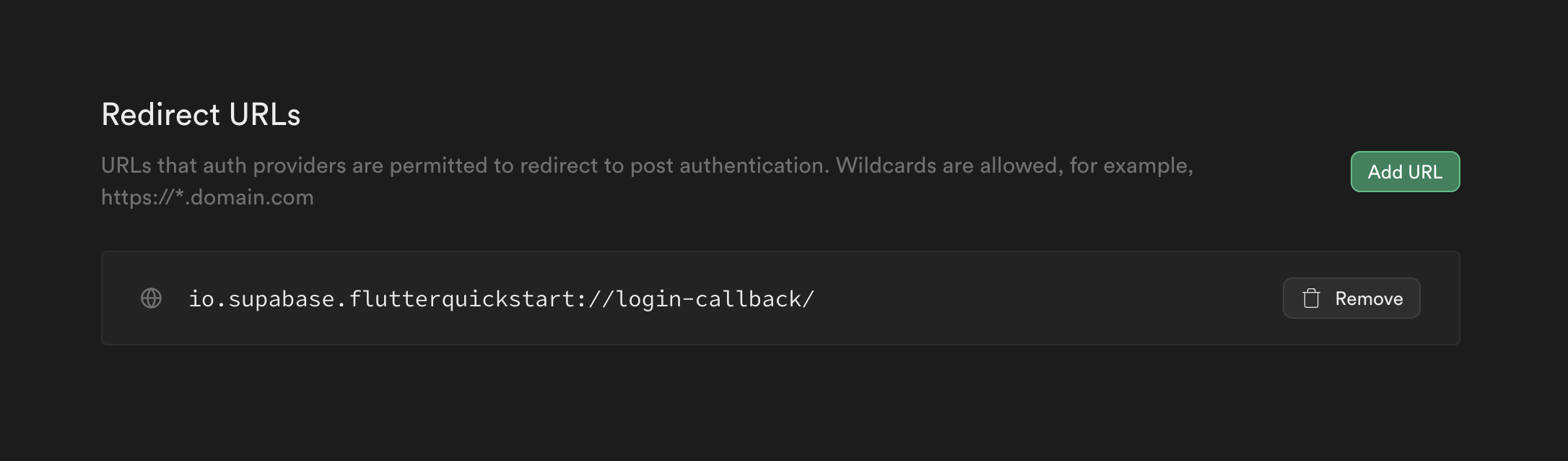
That is it on Supabase's end and the rest are platform specific settings:
Edit the ios/Runner/Info.plist file.
Add CFBundleURLTypes to enable deep linking:
<!-- ... other tags --><plist><dict> <!-- ... other tags --> <!-- Add this array for Deep Links --> <key>CFBundleURLTypes</key> <array> <dict> <key>CFBundleTypeRole</key> <string>Editor</string> <key>CFBundleURLSchemes</key> <array> <string>io.supabase.flutterquickstart</string> </array> </dict> </array> <!-- ... other tags --></dict></plist>Main function#
With deep links configured, initialize the Supabase client inside the main function with the API credentials that you copied earlier. These variables will be exposed on the app, and that's completely fine since we have Row Level Security enabled on our Database.
import 'package:flutter/material.dart';import 'package:supabase_flutter/supabase_flutter.dart';Future<void> main() async { await Supabase.initialize( url: 'YOUR_SUPABASE_URL', publishableKey: 'YOUR_SUPABASE_PUBLISHABLE_KEY', ); runApp(const MyApp());}final supabase = Supabase.instance.client;class MyApp extends StatelessWidget { const MyApp({super.key}); @override Widget build(BuildContext context) { return const MaterialApp(title: 'Supabase Flutter'); }}extension ContextExtension on BuildContext { void showSnackBar(String message, {bool isError = false}) { ScaffoldMessenger.of(this).showSnackBar( SnackBar( content: Text(message), backgroundColor: isError ? Theme.of(this).colorScheme.error : Theme.of(this).snackBarTheme.backgroundColor, ), ); }}Notice that we have a showSnackBar extension method that we will use to show snack bars in the app. You could define this method in a separate file and import it where needed, but for simplicity, we will define it here.
Set up a sign-in page#
Create a Flutter widget to manage sign-ins and sign-ups. We will use Magic Links, so users can sign in with their email without using passwords.
Notice that this page sets up a listener on the user's auth state using onAuthStateChange. A new event will fire when the user comes back to the app by clicking their magic link, which this page can catch and redirect the user accordingly.
import 'dart:async';import 'package:flutter/foundation.dart';import 'package:flutter/material.dart';import 'package:supabase_flutter/supabase_flutter.dart';import 'package:supabase_quickstart/main.dart';import 'package:supabase_quickstart/pages/account_page.dart';class LoginPage extends StatefulWidget { const LoginPage({super.key}); @override State<LoginPage> createState() => _LoginPageState();}class _LoginPageState extends State<LoginPage> { bool _isLoading = false; bool _redirecting = false; late final TextEditingController _emailController = TextEditingController(); late final StreamSubscription<AuthState> _authStateSubscription; Future<void> _signIn() async { try { setState(() { _isLoading = true; }); await supabase.auth.signInWithOtp( email: _emailController.text.trim(), emailRedirectTo: kIsWeb ? null : 'io.supabase.flutterquickstart://login-callback/', ); if (mounted) { context.showSnackBar('Check your email for a login link!'); _emailController.clear(); } } on AuthException catch (error) { if (mounted) context.showSnackBar(error.message, isError: true); } catch (error) { if (mounted) { context.showSnackBar('Unexpected error occurred', isError: true); } } finally { if (mounted) { setState(() { _isLoading = false; }); } } } @override void initState() { _authStateSubscription = supabase.auth.onAuthStateChange.listen( (data) { if (_redirecting) return; final session = data.session; if (session != null) { _redirecting = true; Navigator.of(context).pushReplacement( MaterialPageRoute(builder: (context) => const AccountPage()), ); } }, onError: (error) { if (error is AuthException) { context.showSnackBar(error.message, isError: true); } else { context.showSnackBar('Unexpected error occurred', isError: true); } }, ); super.initState(); } @override void dispose() { _emailController.dispose(); _authStateSubscription.cancel(); super.dispose(); } @override Widget build(BuildContext context) { return Scaffold( appBar: AppBar(title: const Text('Sign In')), body: ListView( padding: const EdgeInsets.symmetric(vertical: 18, horizontal: 12), children: [ const Text('Sign in via the magic link with your email below'), const SizedBox(height: 18), TextFormField( controller: _emailController, decoration: const InputDecoration(labelText: 'Email'), ), const SizedBox(height: 18), ElevatedButton( onPressed: _isLoading ? null : _signIn, child: Text(_isLoading ? 'Sending...' : 'Send Magic Link'), ), ], ), ); }}Set up account page#
After a user is signed in we can allow them to edit their profile details and manage their account.
Create a new widget called account_page.dart.
import 'package:flutter/material.dart';import 'package:supabase_flutter/supabase_flutter.dart';import 'package:supabase_quickstart/main.dart';import 'package:supabase_quickstart/pages/login_page.dart';class AccountPage extends StatefulWidget { const AccountPage({super.key}); @override State<AccountPage> createState() => _AccountPageState();}class _AccountPageState extends State<AccountPage> { final _usernameController = TextEditingController(); final _websiteController = TextEditingController(); String? _avatarUrl; var _loading = true; /// Called once a user id is received within `onAuthenticated()` Future<void> _getProfile() async { setState(() { _loading = true; }); try { final userId = supabase.auth.currentSession!.user.id; final data = await supabase.from('profiles').select().eq('id', userId).single(); _usernameController.text = (data['username'] ?? '') as String; _websiteController.text = (data['website'] ?? '') as String; _avatarUrl = (data['avatar_url'] ?? '') as String; } on PostgrestException catch (error) { if (mounted) context.showSnackBar(error.message, isError: true); } catch (error) { if (mounted) { context.showSnackBar('Unexpected error occurred', isError: true); } } finally { if (mounted) { setState(() { _loading = false; }); } } } /// Called when user taps `Update` button Future<void> _updateProfile() async { setState(() { _loading = true; }); final userName = _usernameController.text.trim(); final website = _websiteController.text.trim(); final user = supabase.auth.currentUser; final updates = { 'id': user!.id, 'username': userName, 'website': website, 'updated_at': DateTime.now().toIso8601String(), }; try { await supabase.from('profiles').upsert(updates); if (mounted) context.showSnackBar('Successfully updated profile!'); } on PostgrestException catch (error) { if (mounted) context.showSnackBar(error.message, isError: true); } catch (error) { if (mounted) { context.showSnackBar('Unexpected error occurred', isError: true); } } finally { if (mounted) { setState(() { _loading = false; }); } } } Future<void> _signOut() async { try { await supabase.auth.signOut(); } on AuthException catch (error) { if (mounted) context.showSnackBar(error.message, isError: true); } catch (error) { if (mounted) { context.showSnackBar('Unexpected error occurred', isError: true); } } finally { if (mounted) { Navigator.of(context).pushReplacement( MaterialPageRoute(builder: (_) => const LoginPage()), ); } } } @override void initState() { super.initState(); _getProfile(); } @override void dispose() { _usernameController.dispose(); _websiteController.dispose(); super.dispose(); } @override Widget build(BuildContext context) { return Scaffold( appBar: AppBar(title: const Text('Profile')), body: ListView( padding: const EdgeInsets.symmetric(vertical: 18, horizontal: 12), children: [ TextFormField( controller: _usernameController, decoration: const InputDecoration(labelText: 'User Name'), ), const SizedBox(height: 18), TextFormField( controller: _websiteController, decoration: const InputDecoration(labelText: 'Website'), ), const SizedBox(height: 18), ElevatedButton( onPressed: _loading ? null : _updateProfile, child: Text(_loading ? 'Saving...' : 'Update'), ), const SizedBox(height: 18), TextButton(onPressed: _signOut, child: const Text('Sign Out')), ], ), ); }}Launch!#
With all components in place, update lib/main.dart.
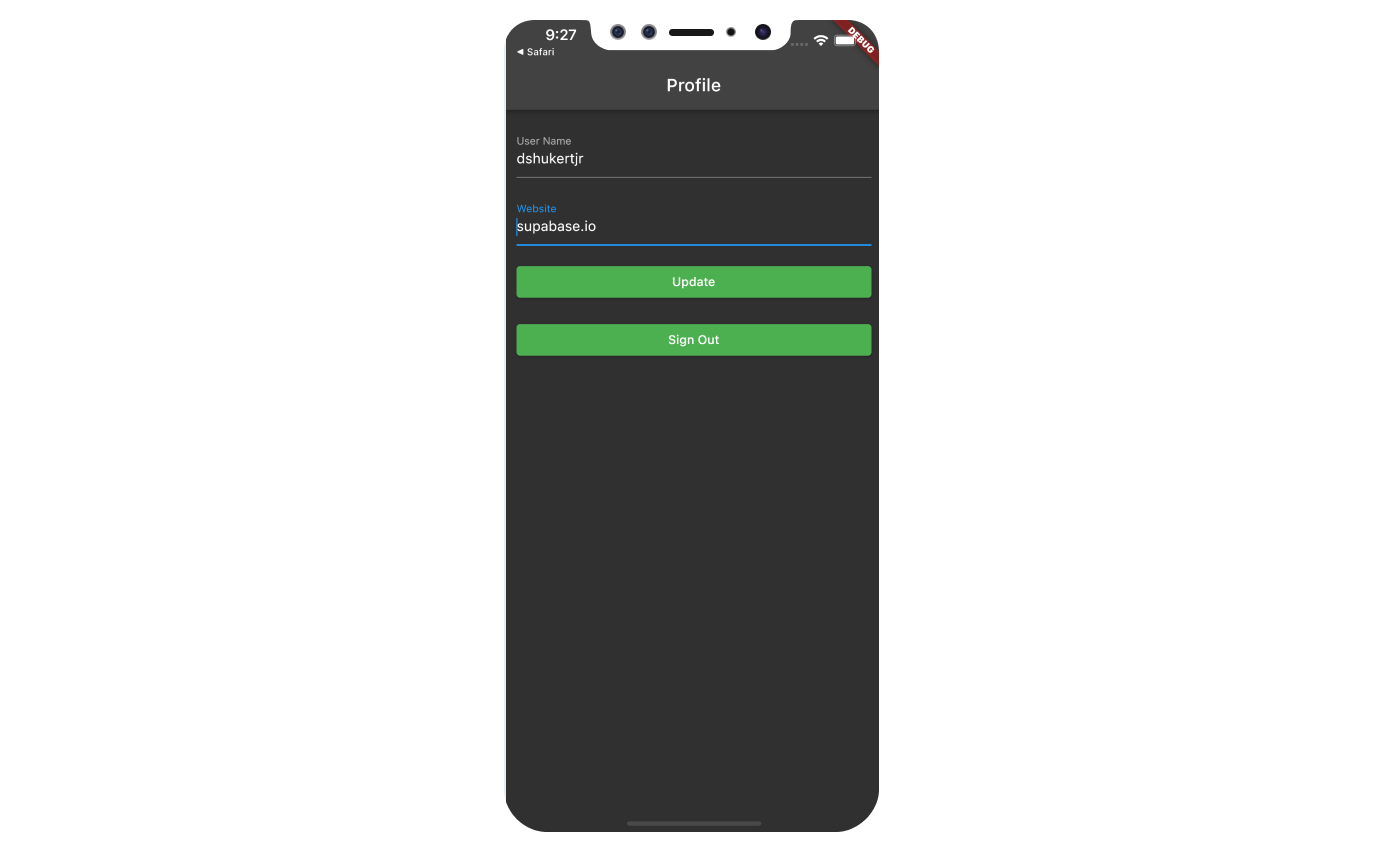
The home of the MaterialApp, meaning the initial page shown to the user, will be the LoginPage if the user is not authenticated, and the AccountPage if the user is authenticated.
We also included some theming to make the app look a bit nicer.
import 'package:flutter/material.dart';import 'package:supabase_flutter/supabase_flutter.dart';import 'package:supabase_quickstart/pages/account_page.dart';import 'package:supabase_quickstart/pages/login_page.dart';Future<void> main() async { await Supabase.initialize( url: 'YOUR_SUPABASE_URL', publishableKey: 'YOUR_SUPABASE_PUBLISHABLE_KEY', ); runApp(const MyApp());}final supabase = Supabase.instance.client;class MyApp extends StatelessWidget { const MyApp({super.key}); @override Widget build(BuildContext context) { return MaterialApp( title: 'Supabase Flutter', theme: ThemeData.dark().copyWith( primaryColor: Colors.green, textButtonTheme: TextButtonThemeData( style: TextButton.styleFrom( foregroundColor: Colors.green, ), ), elevatedButtonTheme: ElevatedButtonThemeData( style: ElevatedButton.styleFrom( foregroundColor: Colors.white, backgroundColor: Colors.green, ), ), ), home: supabase.auth.currentSession == null ? const LoginPage() : const AccountPage(), ); }}extension ContextExtension on BuildContext { void showSnackBar(String message, {bool isError = false}) { ScaffoldMessenger.of(this).showSnackBar( SnackBar( content: Text(message), backgroundColor: isError ? Theme.of(this).colorScheme.error : Theme.of(this).snackBarTheme.backgroundColor, ), ); }}Once that's done, run this in a terminal window to launch on Android or iOS:
flutter runOr for web, run the following command to launch it on localhost:3000
flutter run -d web-server --web-hostname localhost --web-port 3000And then open the browser to localhost:3000 and you should see the completed app.
Bonus: Profile photos#
Every Supabase project is configured with Storage for managing large files like photos and videos.
Making sure we have a public bucket#
We will be storing the image as a publicly sharable image.
Make sure your avatars bucket is set to public, and if it is not, change the publicity by clicking the dot menu that appears when you hover over the bucket name.
You should see an orange Public badge next to your bucket name if your bucket is set to public.
Adding image uploading feature to account page#
We will use image_picker plugin to select an image from the device.
Add the following line in your pubspec.yaml file to install image_picker:
image_picker: ^1.0.5Using image_picker requires some additional preparation depending on the platform.
Follow the instruction on README.md of image_picker on how to set it up for the platform you are using.
Once you are done with all of the above, it is time to dive into coding.
Create an upload widget#
Create an avatar so the user can upload a profile photo. We can start by creating a new component:
import 'package:flutter/material.dart';import 'package:image_picker/image_picker.dart';import 'package:supabase_flutter/supabase_flutter.dart';import 'package:supabase_quickstart/main.dart';class Avatar extends StatefulWidget { const Avatar({ super.key, required this.imageUrl, required this.onUpload, }); final String? imageUrl; final void Function(String) onUpload; @override State<Avatar> createState() => _AvatarState();}class _AvatarState extends State<Avatar> { bool _isLoading = false; @override Widget build(BuildContext context) { return Column( children: [ if (widget.imageUrl == null || widget.imageUrl!.isEmpty) Container( width: 150, height: 150, color: Colors.grey, child: const Center( child: Text('No Image'), ), ) else Image.network( widget.imageUrl!, width: 150, height: 150, fit: BoxFit.cover, ), ElevatedButton( onPressed: _isLoading ? null : _upload, child: const Text('Upload'), ), ], ); } Future<void> _upload() async { final picker = ImagePicker(); final imageFile = await picker.pickImage( source: ImageSource.gallery, maxWidth: 300, maxHeight: 300, ); if (imageFile == null) { return; } setState(() => _isLoading = true); try { final bytes = await imageFile.readAsBytes(); final fileExt = imageFile.path.split('.').last; final fileName = '${DateTime.now().toIso8601String()}.$fileExt'; final filePath = fileName; await supabase.storage.from('avatars').uploadBinary( filePath, bytes, fileOptions: FileOptions(contentType: imageFile.mimeType), ); final imageUrlResponse = await supabase.storage .from('avatars') .createSignedUrl(filePath, 60 * 60 * 24 * 365 * 10); widget.onUpload(imageUrlResponse); } on StorageException catch (error) { if (mounted) { context.showSnackBar(error.message, isError: true); } } catch (error) { if (mounted) { context.showSnackBar('Unexpected error occurred', isError: true); } } setState(() => _isLoading = false); }}Add the new widget#
And then we can add the widget to the Account page as well as some logic to update the avatar_url whenever the user uploads a new avatar.
import 'package:flutter/material.dart';import 'package:supabase_flutter/supabase_flutter.dart';import 'package:supabase_quickstart/components/avatar.dart';import 'package:supabase_quickstart/main.dart';import 'package:supabase_quickstart/pages/login_page.dart';class AccountPage extends StatefulWidget { const AccountPage({super.key}); @override State<AccountPage> createState() => _AccountPageState();}class _AccountPageState extends State<AccountPage> { final _usernameController = TextEditingController(); final _websiteController = TextEditingController(); String? _avatarUrl; var _loading = true; /// Called once a user id is received within `onAuthenticated()` Future<void> _getProfile() async { setState(() { _loading = true; }); try { final userId = supabase.auth.currentSession!.user.id; final data = await supabase.from('profiles').select().eq('id', userId).single(); _usernameController.text = (data['username'] ?? '') as String; _websiteController.text = (data['website'] ?? '') as String; _avatarUrl = (data['avatar_url'] ?? '') as String; } on PostgrestException catch (error) { if (mounted) context.showSnackBar(error.message, isError: true); } catch (error) { if (mounted) { context.showSnackBar('Unexpected error occurred', isError: true); } } finally { if (mounted) { setState(() { _loading = false; }); } } } /// Called when user taps `Update` button Future<void> _updateProfile() async { setState(() { _loading = true; }); final userName = _usernameController.text.trim(); final website = _websiteController.text.trim(); final user = supabase.auth.currentUser; final updates = { 'id': user!.id, 'username': userName, 'website': website, 'updated_at': DateTime.now().toIso8601String(), }; try { await supabase.from('profiles').upsert(updates); if (mounted) context.showSnackBar('Successfully updated profile!'); } on PostgrestException catch (error) { if (mounted) context.showSnackBar(error.message, isError: true); } catch (error) { if (mounted) { context.showSnackBar('Unexpected error occurred', isError: true); } } finally { if (mounted) { setState(() { _loading = false; }); } } } Future<void> _signOut() async { try { await supabase.auth.signOut(); } on AuthException catch (error) { if (mounted) context.showSnackBar(error.message, isError: true); } catch (error) { if (mounted) { context.showSnackBar('Unexpected error occurred', isError: true); } } finally { if (mounted) { Navigator.of(context).pushReplacement( MaterialPageRoute(builder: (_) => const LoginPage()), ); } } } /// Called when image has been uploaded to Supabase storage from within Avatar widget Future<void> _onUpload(String imageUrl) async { try { final userId = supabase.auth.currentUser!.id; await supabase.from('profiles').upsert({ 'id': userId, 'avatar_url': imageUrl, }); if (mounted) { const SnackBar( content: Text('Updated your profile image!'), ); } } on PostgrestException catch (error) { if (mounted) context.showSnackBar(error.message, isError: true); } catch (error) { if (mounted) { context.showSnackBar('Unexpected error occurred', isError: true); } } if (!mounted) { return; } setState(() { _avatarUrl = imageUrl; }); } @override void initState() { super.initState(); _getProfile(); } @override void dispose() { _usernameController.dispose(); _websiteController.dispose(); super.dispose(); } @override Widget build(BuildContext context) { return Scaffold( appBar: AppBar(title: const Text('Profile')), body: ListView( padding: const EdgeInsets.symmetric(vertical: 18, horizontal: 12), children: [ Avatar( imageUrl: _avatarUrl, onUpload: _onUpload, ), const SizedBox(height: 18), TextFormField( controller: _usernameController, decoration: const InputDecoration(labelText: 'User Name'), ), const SizedBox(height: 18), TextFormField( controller: _websiteController, decoration: const InputDecoration(labelText: 'Website'), ), const SizedBox(height: 18), ElevatedButton( onPressed: _loading ? null : _updateProfile, child: Text(_loading ? 'Saving...' : 'Update'), ), const SizedBox(height: 18), TextButton(onPressed: _signOut, child: const Text('Sign Out')), ], ), ); }}Congratulations, you've built a fully functional user management app using Flutter and Supabase!